Explaining custom catalogue setup for e-commerce
TL;DR:
- Custom catalogue setup involves creating tailored digital product catalogs that target specific customer groups and sales channels to improve conversion.
- It requires structured data files hosted securely with regular updates, clear hierarchies, and mobile-first design principles for effective user experience.
Custom catalogue setup is the process of creating tailored digital product catalogues that present specific products, pricing, and content to defined customer groups or sales channels. For e-commerce managers and business owners, this is not a cosmetic exercise. Personalised catalogues are proven drivers of better customer experiences and higher B2B conversion rates compared to generic, one-size-fits-all product listings. Platforms including Klaviyo, Meta Commerce Manager, and WhatsApp Business all support custom catalogue feeds, and understanding how to set one up correctly is the difference between a catalogue that converts and one that frustrates. This guide covers the technical requirements, design principles, and practical steps you need.
What does explaining custom catalogue setup actually involve?
Custom catalogue setup refers to structuring, formatting, and publishing product data in a way that a specific platform or customer segment can consume accurately. The industry term you will encounter across platforms and documentation is product catalogue feed, and it describes the file or data source that powers your catalogue wherever it appears, whether that is in a marketing email, a social commerce channel, or a B2B portal.
The core components of any catalogue setup are the same regardless of platform: a structured data file containing product information, a hosting location that platforms can access, and a defined update schedule. What makes a catalogue custom is the deliberate selection of which products appear, in what order, with what pricing, and for which audience. A wholesale buyer logging into your Magento store should see trade pricing and bulk SKUs. A retail customer on the same store should see RRP and consumer-facing descriptions. That separation is catalogue customisation in practice.
For custom ecommerce retail brands, getting this architecture right from the start saves significant rework later, particularly when you are managing hundreds or thousands of SKUs across multiple channels.

What are the technical requirements for custom catalogue setup?
Getting the technical foundations right is non-negotiable. A catalogue feed that fails to sync, contains malformed data, or exceeds file size limits will cause your product data to go stale or disappear from your sales channels entirely.
Supported data formats
The three most common formats for catalogue feeds are:
- CSV and Excel templates — straightforward for smaller catalogues and manual workflows, widely supported across platforms
- XML — more structured and better suited to automated pipelines; the BMEcat 1.2 standard is widely used in B2B commerce for product data exchange
- JSON — increasingly common for API-driven catalogue integrations, particularly with headless commerce setups
Each format has its place, but the choice should be driven by your inventory size and technical capability, not convenience. We cover this comparison in more detail in the feed management section below.
Hosting and file size requirements
Your catalogue feed file must be hosted on a secure HTTPS URL so that platforms can fetch it reliably. Klaviyo, for example, recommends keeping feed files under 50MB for optimal performance. If your catalogue exceeds this, splitting large files into multiple feeds prevents sync timeouts and keeps your data fresh. This is not just a Klaviyo constraint. Most catalogue platforms impose similar practical limits, and oversized files are one of the most common causes of failed catalogue updates.
For ecommerce cloud hosting, using a CDN-backed storage solution for your feed files reduces latency and improves reliability across geographies.
Required fields and update frequency
Every platform has mandatory fields. At minimum, expect to provide:
- Product ID — unique identifier for each SKU
- Title and description — accurate, keyword-relevant product names and copy
- Price and currency — including sale prices where applicable
- Image URL — direct link to a hosted product image
- Product URL — the canonical page on your store
- Availability — in stock, out of stock, or preorder status
Klaviyo recommends a 6-hour sync interval to keep catalogue data fresh. This matters most for price and availability fields, where stale data leads to customer complaints and abandoned purchases.
Pro Tip: Map your feed fields to platform requirements before you build the feed file. Discovering a missing required field after upload wastes time and can cause partial catalogue failures that are difficult to diagnose.
How do you design and organise a catalogue for better UX?
Catalogue structure is as important as the data it contains. Cluttered catalogue layouts cause high bounce rates, while a clear hierarchy prioritising brand, category, and price helps customers make decisions faster. This is not a design opinion. It is a measurable commercial outcome.
Building a clear product hierarchy
Start with your top-level categories, then subcategories, then individual products. Each level should reduce the customer’s decision set, not expand it. A wholesale buyer looking for industrial fixings should not have to scroll through consumer accessories to find what they need. Segment your catalogue deliberately, and apply filters or faceted navigation where your platform supports it.
Product detail pages within the catalogue should include:
- Product name — specific and descriptive, not a stock code
- Short description — two to three sentences covering key specifications
- Multiple images — WhatsApp Business supports up to 10 images per product, and high-resolution images at minimum 500×500 pixels improve engagement on mobile-first platforms
- Price — clearly displayed, with any tiered or trade pricing shown where relevant
- CTA or product link — a direct path to purchase or enquiry
Design principles that convert
Consistency across your catalogue builds trust. Use the same image style, background, and aspect ratio for every product. Whitespace is not wasted space. It directs attention and reduces cognitive load. For mobile users, which represent the majority of catalogue browsing in 2026, every element needs to render cleanly on a small screen. Our mobile-first design guide covers the specific layout considerations for UK e-commerce in detail.
Tools like Canva and Adobe InDesign work well for print-ready or PDF catalogue production. For digital flipbook formats, FlipLink offers free PDF to flipbook conversion with optional premium analytics and custom domain features for around $129 as a lifetime purchase. This is a practical entry point for businesses that want a polished digital catalogue without a full development build.
| Design element | Recommended standard |
|---|---|
| Image resolution | Minimum 500x500px; 1000x1000px preferred |
| Images per product | Up to 10 for mobile platforms (e.g. WhatsApp Business) |
| Category depth | No more than three levels for consumer catalogues |
| Mobile layout | Single-column, thumb-friendly CTAs |
| File format for digital | PDF flipbook or responsive HTML catalogue |
Pro Tip: Add product codes to your catalogue descriptions. On platforms like WhatsApp Business, product codes in descriptions reduce back-and-forth communication and make order processing significantly faster for both parties.
CSV vs XML: which feed format should you use?
The format you choose for your catalogue feed has a direct impact on how much manual work your team carries, how accurately your data integrates with third-party platforms, and how well your catalogue scales as your product range grows.
| Feed format | Best for | Key advantage | Key limitation |
|---|---|---|---|
| CSV / Excel | Small catalogues, manual workflows | Easy to create and edit without technical skills | Error-prone at scale; no native data validation |
| XML (BMEcat 1.2) | Enterprise B2B, ERP integrations | Structured XML feeds reduce manual effort and improve integration accuracy | Requires technical setup; harder to edit manually |
| JSON | API-driven or headless commerce | Flexible and lightweight for real-time feeds | Less supported by legacy platforms |
Beginners and smaller operations can start with CSV templates and migrate to XML as their catalogue complexity grows. The critical point is not to stay on CSV longer than necessary. Once you are managing more than a few hundred SKUs across multiple channels, the manual reconciliation work on CSV files becomes a genuine operational risk. Errors compound, and a pricing mistake in a CSV feed that syncs to Meta Commerce Manager can surface incorrect prices to thousands of customers before anyone notices.
For Magento-based stores handling B2B wholesale, BMEcat 1.2 is the format most likely to align with your buyers’ procurement systems. This reduces friction at the point of integration and positions your catalogue as enterprise-ready.
How to implement and maintain your custom catalogue in practice
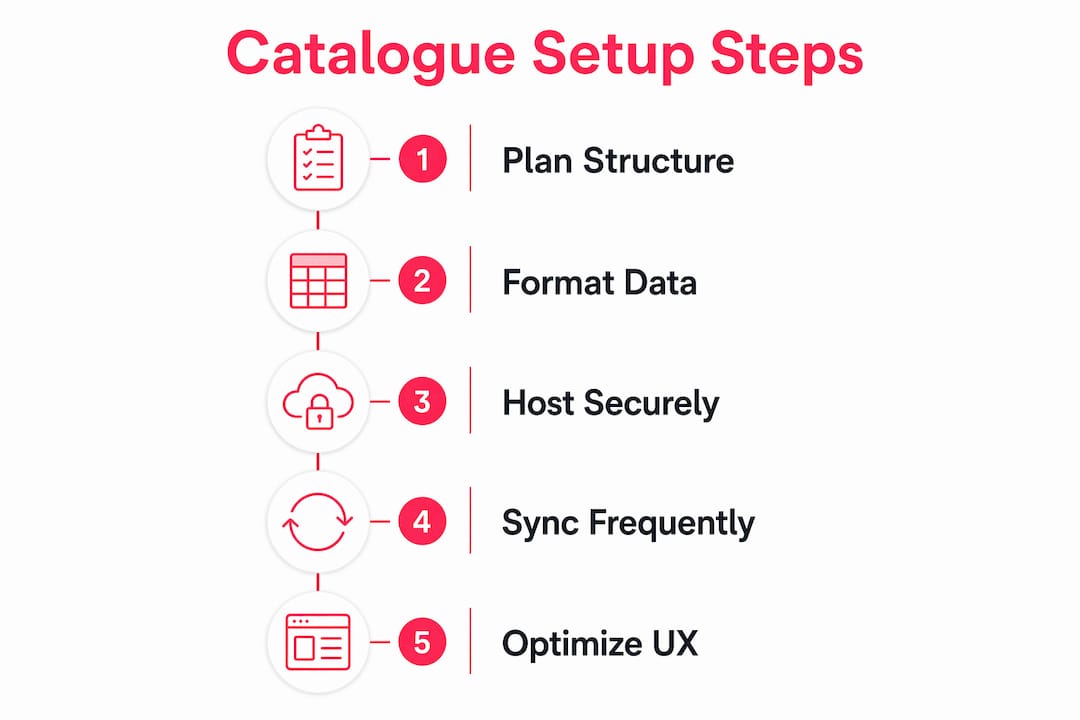
Setting up a catalogue feed is a one-time task. Keeping it accurate, performant, and aligned with your business is an ongoing discipline. Here is how we approach it.
-
Prepare your feed file. Export your product data from your platform (Magento, Shopify, or your PIM system) in your chosen format. Clean the data before export: remove discontinued SKUs, correct pricing anomalies, and standardise image URLs.
-
Host the feed on a secure HTTPS URL. Upload the file to your CDN, cloud storage, or server. Confirm the URL is publicly accessible and returns the correct content type header for your format (e.g. "text/csv
orapplication/xml`). -
Map feed fields to platform requirements. In Klaviyo, for example, you map your feed columns to Klaviyo’s catalogue item properties during the sync setup. Mismatched field names are the most common cause of incomplete catalogue imports.
-
Set your sync schedule. Configure the platform to fetch your feed at the recommended interval. For most use cases, a 6-hour refresh is sufficient. For flash sales or high-velocity inventory, consider a shorter interval or a real-time API push.
-
Test on mobile first. Preview your catalogue on a mobile device before publishing. Check image rendering, price display, and CTA visibility. Most catalogue browsing happens on mobile, so a desktop-only review is not sufficient.
-
Track performance analytics. Once live, monitor catalogue performance using your platform’s native analytics or a dedicated tool. Our guide on e-commerce analytics covers how to interpret catalogue engagement data and act on it.
Pro Tip: After any bulk product update, manually trigger a feed re-sync rather than waiting for the scheduled interval. This prevents customers from seeing outdated prices or availability during high-traffic periods.
Key takeaways
A well-executed custom catalogue setup combines accurate structured data, deliberate product hierarchy, and a reliable sync process to deliver the right products to the right audience at the right time.
| Point | Details |
|---|---|
| Format choice matters | Use CSV for small catalogues; migrate to XML BMEcat 1.2 for enterprise or B2B integration. |
| File size and hosting | Keep feed files under 50MB on a secure HTTPS URL to prevent sync failures. |
| Structure drives conversion | A clear brand, category, and price hierarchy reduces bounce rates and speeds purchase decisions. |
| Sync frequency | A 6-hour sync interval keeps price and availability data accurate across channels. |
| Mobile-first design | Minimum 500x500px images and thumb-friendly layouts are non-negotiable for mobile catalogue performance. |
What I have learned from building catalogues at scale
The most common mistake I see e-commerce managers make is treating catalogue setup as a one-off technical task rather than an ongoing content discipline. They spend weeks getting the feed live, then leave it largely untouched for months. Product data drifts. Images go stale. Discontinued SKUs linger. The catalogue that launched well quietly becomes a liability.
The second thing I would flag is the temptation to over-engineer the structure too early. I have seen businesses build elaborate multi-level category hierarchies before they have validated which product groupings their customers actually use. Start with a flat, simple structure. Add complexity only when your analytics show customers are navigating deeper than your current hierarchy allows.
On the technical side, the hosting question is underestimated. A feed file sitting on a shared hosting server with no CDN will cause intermittent sync failures that are genuinely difficult to diagnose. Treat your feed URL like a production API endpoint. It needs uptime, monitoring, and a clear owner.
Finally, if you are running B2B on Magento with account hierarchies and tiered pricing, your catalogue setup is significantly more complex than a standard DTC build. The catalogue is not just a product list. It is a pricing engine, a permissions layer, and a customer experience system all at once. Plan accordingly, and get specialist input before you commit to a data architecture.
— Steve
How Bigeyedeers can help with your catalogue setup
If you are working through the complexity of custom catalogue setup and want a team that has done this before, we are here to help. At Bigeyedeers, we have over 17 years of experience building and supporting Magento and Shopify stores, including advanced B2B catalogues with tiered pricing, account hierarchies, and ERP integrations.

Whether you need a clean catalogue feed built from scratch, a Magento catalogue architecture reviewed, or a full Magento or Shopify build that supports multiple customer groups and channels, our team in Cardiff and Exeter can scope and deliver it. We also support Klaviyo integration for catalogue-driven lifecycle marketing, so your product data works harder across every touchpoint. Get in touch to talk through your requirements.
FAQ
What is a custom catalogue feed?
A custom catalogue feed is a structured data file, typically in CSV, XML, or JSON format, that contains your product information and is hosted on a URL that platforms like Klaviyo or Meta Commerce Manager can fetch and sync automatically.
How often should a catalogue feed be updated?
Klaviyo recommends a 6-hour sync interval for catalogue feeds. For businesses with frequently changing prices or stock levels, a shorter interval or real-time API push is advisable to keep data accurate.
What file size limit applies to catalogue feeds?
Most platforms, including Klaviyo, recommend keeping catalogue feed files under 50MB. If your catalogue exceeds this, split it into multiple smaller files to prevent sync timeouts and failed updates.
When should I use XML instead of CSV for my catalogue?
XML formats such as BMEcat 1.2 are recommended for enterprise catalogues, B2B operations, and any setup requiring ERP integration. CSV works well for smaller catalogues but becomes error-prone and difficult to manage at scale.
Do I need a separate catalogue for each sales channel?
Not necessarily, but it is best practice to tailor your catalogue feed to each channel’s requirements. Different platforms have different mandatory fields, image specifications, and category structures, so a single generic feed often underperforms compared to a channel-specific one.
Recommended



Adobe Commerce (Magento)
Formerly known as Magento, Adobe Commerce is built for complex catalogues, integrations, and long term growth. We design and develop stable, scalable stores that support demanding eCommerce requirements, including multi-store setups, complex pricing, and Hyva based performance improvements.

Bespoke Build
We design and build custom eCommerce platforms for businesses with complex workflows, integrations, or non standard requirements. Built from scratch around your business needs using Laravel and modern architectures.

Working with brands across the UK from our offices in Cardiff and Exeter, you deal directly with a senior team of designers and developers specialising in Shopify, Magento, WordPress and bespoke eCommerce platforms.
We focus on commercial outcomes. Better conversion rates, strong SEO foundations and eCommerce platforms that continue to improve long after launch.