What is storefront architecture: a 2026 guide
TL;DR:
- Storefront architecture determines how an online store presents content and connects to its core systems. Choosing the right model impacts flexibility, operational complexity, and conversion rates, with operator autonomy often outperforming page speed. Successful design aligns with team capabilities, prioritizes content editing ease, and avoids unnecessary technical bottlenecks.
Storefront architecture is defined as the structural design and technical framework that governs how an online store’s presentation layer is built, organised, and delivered to shoppers. It determines everything from how product pages render on mobile to how your marketing team updates a banner without raising a support ticket. Get it wrong and you pay for it in lost conversions, slow deployments, and a development team that becomes a bottleneck for every content change. Salesforce built its Storefront Reference Architecture by analysing over 2,000 mobile storefronts, which tells you how seriously the industry takes this decision.
What is storefront architecture and what does it actually include?
Storefront architecture covers two distinct layers: the presentation layer and the commerce core. The presentation layer is everything a shopper sees and interacts with: page templates, navigation, product grids, and checkout flows. The commerce core handles catalogue management, pricing logic, inventory, and order processing. How tightly or loosely these two layers connect defines your architectural model.

The presentation layer typically relies on front-end frameworks, UI component libraries such as Bootstrap, and JavaScript controllers that manage page behaviour. The commerce core exposes data through REST APIs or GraphQL endpoints. Understanding ecommerce architecture fundamentals helps you see why the connection between these layers is where most performance and flexibility decisions get made.
Key elements that make up a complete storefront design include:
- Page templates and layout grids that control how content blocks are positioned across device sizes
- Component libraries that define reusable UI elements such as product cards, hero banners, and navigation menus
- API integrations that pull live pricing, stock levels, and personalisation data into the presentation layer
- CMS integration that lets non-technical team members edit copy, swap images, and reorder content blocks
- Device optimisation rules that govern how layouts adapt from desktop to tablet to mobile
Pro Tip: Design every component with a non-developer editor in mind from day one. If your marketing manager cannot update a homepage banner without filing a ticket, your architecture has already failed one of its core jobs.
What are the main types of storefront architecture?
Three architectural models dominate ecommerce in 2026: monolithic, headless, and partial headless. Each carries a distinct set of trade-offs, and the right choice depends on your team’s skills as much as your technical ambitions.
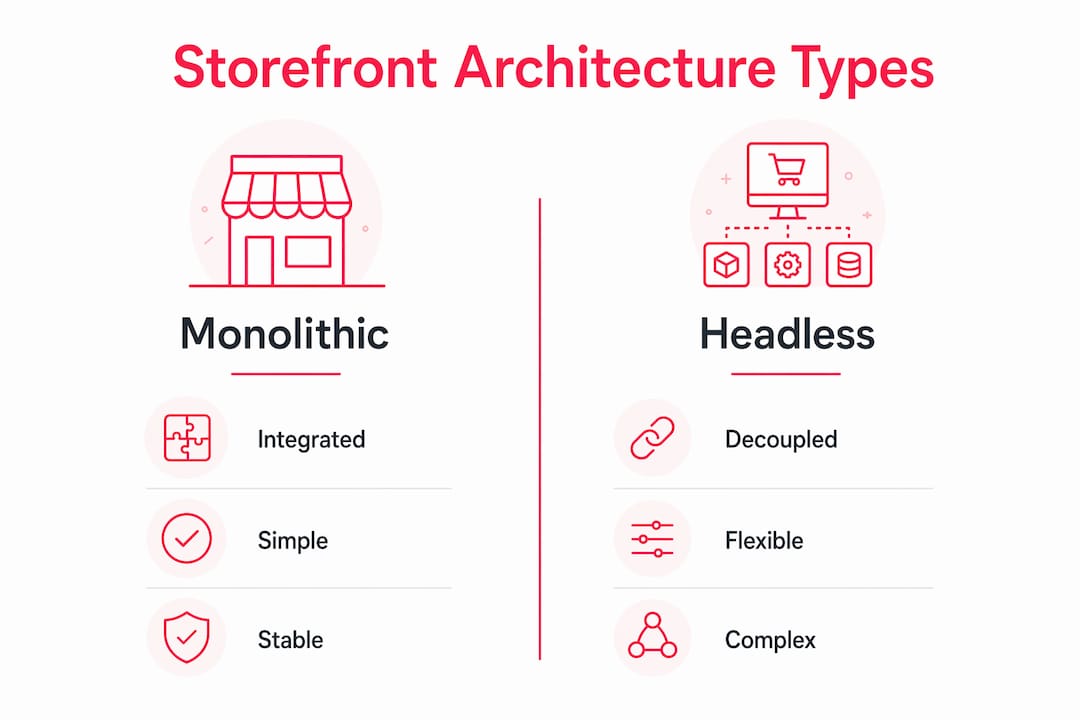
Monolithic architecture bundles the presentation layer and commerce core into a single platform. Deployments are simpler, the technology stack is unified, and your team manages one system. The downside is resource contention: a spike in background processing can slow the front end, and customising the UI often means working within the platform’s constraints.
Headless architecture decouples the front end entirely. Your storefront is a separate application that communicates with the commerce core through APIs. This gives front-end teams full creative freedom and lets you deploy to multiple channels from one commerce backend. The cost is distributed system complexity, including API versioning, eventual consistency challenges, and an integration tax that frequently doubles maintenance costs beyond initial estimates. Every architecture choice involves trade-offs in failure modes, and teams must pick what aligns with their operational strengths.
Partial headless sits between the two. It decouples the storefront UI while keeping the commerce core intact on a stable platform. Partial headless architecture balances flexibility and stability by retaining core commerce logic without the full complexity of a distributed system. For many retailers, this is the most practical path forward.
| Architecture type | Front-end freedom | Operational complexity | Best suited for |
|---|---|---|---|
| Monolithic | Limited | Low | Smaller teams, faster launches |
| Headless | Full | High | Enterprise brands with dedicated engineering |
| Partial headless | High | Medium | Growing retailers balancing agility and stability |
Pro Tip: Before committing to headless, audit your team’s capacity to manage API versioning and front-end deployments independently. Many brands underestimate the ongoing engineering overhead.
How does storefront architecture affect conversion rates?
Layout and architecture decisions have a direct, measurable impact on revenue. Analysis of 8.8 million Shopify sessions found a median 13.4% difference in conversion rates between the best and worst layouts presenting identical content. That gap exists before you change a single product, price, or promotion. It is purely structural.
Salesforce’s SFRA demonstrates the same principle at scale. Its data-driven design approach was informed by over 2,000 mobile storefronts, encoding proven UX patterns into a reusable framework. The result is a prebuilt architecture that reduces project costs and accelerates time to value for merchants who adopt it.
The factors that drive conversion through architecture include:
- Content hierarchy: placing the most persuasive information where shoppers look first
- Page load performance: faster rendering reduces abandonment, particularly on mobile
- Operator autonomy: the ability to run A/B tests and update content without developer sprints
- Checkout friction: the number of steps and form fields between intent and purchase
Operator autonomy is more critical than page speed scores for driving ecommerce growth. A marketing team that can test a new homepage layout in an afternoon will outperform a technically faster site that requires a two-week development cycle for every content change. Speed metrics matter, but the ability to act quickly on commercial insight matters more. You can explore conversion rate improvement tactics that work alongside strong architecture to compound these gains.
How to design a storefront architecture that performs
Choosing the right architecture starts with an honest assessment of your team, not your aspirations. A small DTC brand with two developers should not build a fully headless storefront. An enterprise retailer running multi-region, multi-currency operations probably cannot afford the rigidity of a monolith. Match the architecture to the people who will maintain it.
Follow these steps when planning or rebuilding your storefront:
- Audit your current bottlenecks. Identify whether your biggest problems are technical (slow page loads, poor mobile rendering) or operational (slow content updates, inability to test). The answer shapes which architectural model you need.
- Define operator requirements first. List every task your marketing and merchandising teams perform weekly. Design the CMS integration and component system around those tasks before writing a line of front-end code.
- Choose your checkout strategy carefully. Rebuilding checkout in headless setups typically reduces conversion. Brands that switched back to native platform checkouts reported conversion lifts of 8–14%. Use native checkout tools with extensibility features, such as Shopify’s Checkout Extensibility suite, rather than rebuilding from scratch.
- Build a modular component library. Each UI component should be independently editable, testable, and deployable. This is what makes continuous optimisation possible post-launch.
- Establish a conversion measurement framework before launch. Define which metrics you will track, set baseline values, and schedule your first round of layout tests within 30 days of going live.
- Plan for the integration tax. If you are building headless, budget for API maintenance, versioning, and the ongoing cost of keeping your front end in sync with commerce core updates.
Designing for non-developer content editors from the start is the single most overlooked step in storefront builds. Post-launch bottlenecks almost always trace back to a CMS that was bolted on rather than built in. Brands that treat content autonomy as a core architectural requirement consistently outperform those that treat it as a nice-to-have. For teams exploring how front-end frameworks fit into this picture, the choice of framework shapes how quickly your component library can grow and adapt.
Pro Tip: Run your first A/B test within 30 days of launch. The data you collect in that window is more valuable than any pre-launch assumption, and it sets the rhythm for continuous improvement.
Good conversion rate optimisation practice treats architecture as a living system, not a one-time decision. Schedule quarterly reviews of your component performance, page load metrics, and editor workflow efficiency.
Key takeaways
Storefront architecture is the single structural decision that determines whether your online store can adapt quickly, convert reliably, and scale without accumulating technical debt.
| Point | Details |
|---|---|
| Architecture defines conversion potential | Layout alone drives a median 13.4% conversion gap across identical content, per Shopify session analysis. |
| Three models, three trade-off profiles | Monolithic suits smaller teams; headless suits enterprise engineering; partial headless suits most growing retailers. |
| Operator autonomy outranks page speed | The ability to update content and run tests without developer input drives more growth than Lighthouse scores. |
| Checkout rebuilds usually backfire | Native platform checkouts outperform custom headless checkouts for most DTC brands; use extensibility tools instead. |
| Design for editors from day one | CMS integration built around non-developer workflows prevents post-launch bottlenecks and protects conversion. |
The part most teams get wrong
I have reviewed a lot of storefront builds over the years, and the pattern that causes the most commercial damage is not a bad technology choice. It is a good technology choice made for the wrong reasons.
Teams choose headless because it sounds modern, because a conference talk made it compelling, or because a competitor announced they had done it. Eighteen months later, they have a technically impressive storefront that their marketing team cannot touch without raising a ticket. The 18-month rebuild cycle that prioritises technical speed over content autonomy is one of the most common failure modes in ecommerce architecture. I have seen it happen to brands with serious budgets and talented engineers.
My honest view is this: the best storefront architecture is the one your whole team can operate, not just your developers. Technical excellence that creates a bottleneck for commercial decisions is not excellence. It is a liability. If your merchandising team cannot launch a seasonal campaign without a sprint, your architecture is working against your business.
The brands that win are the ones that treat architecture as a commercial tool, not an engineering trophy. They pick the model that fits their operational reality, build content autonomy in from the start, and iterate relentlessly after launch. That is less glamorous than a full headless rebuild, but it converts better.
— Steve
How Bigeyedeers approaches storefront architecture
Bigeyedeers has spent over 17 years building high-performing online stores on Magento and Shopify, and storefront architecture sits at the centre of every project we take on.

We use Figma to map user journeys and component systems before development begins, so architectural decisions are grounded in real operator workflows, not assumptions. Whether you need a Magento web design build with Hyvä frontend performance, a Shopify storefront with native checkout extensibility, or a partial headless setup that gives your marketing team genuine autonomy, we design the architecture around your commercial priorities. We also integrate Klevu for product discovery and Klaviyo for lifecycle marketing, so your storefront works as a complete growth system from day one.
FAQ
What is storefront architecture in ecommerce?
Storefront architecture is the structural design and technical framework that defines how an online store’s presentation layer is built and connected to its commerce core. It governs page rendering, content management, API integrations, and the overall user experience.
What are the main types of storefront architecture?
The three main types are monolithic, headless, and partial headless. Monolithic bundles front end and back end together; headless decouples them via APIs; partial headless decouples the UI while keeping the commerce core on a stable platform.
How does storefront architecture affect conversion rates?
Layout and structural decisions drive a median 13.4% conversion rate difference across identical content, based on analysis of 8.8 million Shopify sessions. Architecture determines how quickly teams can test and update the storefront, which compounds this impact over time.
Should I rebuild my checkout in a headless storefront?
No. Brands that rebuilt custom headless checkouts and then switched back to native platform checkouts reported conversion lifts of 8–14%. Use native checkout tools with extensibility features rather than building a custom checkout from scratch.
What is operator autonomy in storefront architecture?
Operator autonomy is the ability of non-developer team members to update content, run A/B tests, and launch campaigns without requiring engineering support. It is a more reliable driver of ecommerce growth than page speed scores alone.
Recommended



Adobe Commerce (Magento)
Formerly known as Magento, Adobe Commerce is built for complex catalogues, integrations, and long term growth. We design and develop stable, scalable stores that support demanding eCommerce requirements, including multi-store setups, complex pricing, and Hyva based performance improvements.

Bespoke Build
We design and build custom eCommerce platforms for businesses with complex workflows, integrations, or non standard requirements. Built from scratch around your business needs using Laravel and modern architectures.

Working with brands across the UK from our offices in Cardiff and Exeter, you deal directly with a senior team of designers and developers specialising in Shopify, Magento, WordPress and bespoke eCommerce platforms.
We focus on commercial outcomes. Better conversion rates, strong SEO foundations and eCommerce platforms that continue to improve long after launch.