Boost website speed for more sales: a UK e-commerce guide
TL;DR:
- Every second your online store delays in loading causes potential customers to reconsider their purchase decisions.
- Speed directly impacts revenue, as slow-loading sites significantly reduce conversions, especially during promotional campaigns.
Every second your online store takes to load is a second your shoppers are reconsidering their purchase. A one-second delay in page load time can reduce conversion rates by 7%. Across a year of trading, that figure compounds into real lost revenue. For UK ecommerce managers and business owners, this is not a technical nicety to revisit eventually. It is a commercial priority to act on now. This guide gives you practical, measurable steps to diagnose, fix, and sustain website speed improvements that translate directly into better conversion rates and stronger sales.
Table of Contents
- Why website speed matters for UK e-commerce
- What you’ll need: tools and key measurement points
- Step by step: optimising your website for speed
- How to test, verify and avoid common mistakes
- What most speed guides miss: our take on sustainable optimisation
- Take your ecommerce site further with expert support
- Frequently asked questions
Key Takeaways
| Point | Details |
|---|---|
| Speed impacts sales | Every extra second of load time can significantly lower conversions and revenue for UK ecommerce brands. |
| Focus on money pages | Optimising category, product, and checkout pages first yields the greatest return from speed improvements. |
| Use real-user measurement | Test and retest actual customer journeys with robust tools to monitor real-world site speed, not just lab results. |
| Balance speed and function | Sustainable performance means blending fast load times with essential ecommerce features for a seamless customer experience. |
Why website speed matters for UK e-commerce
Speed is not just a user experience issue. It is a revenue issue. The relationship between site speed and sales is well established, and the data from UK-specific research confirms the scale of the problem facing domestic retailers.
A study by Koozai tested 460 pages across UK ecommerce sites and found that only 1 to 2% achieved a ‘good’ LCP score. The average LCP (Largest Contentful Paint) sat between 12 and 14 seconds. Google’s own threshold for a ‘good’ LCP is under 2.5 seconds. That gap is enormous, and it means most UK ecommerce sites are actively losing customers every single day.
Let that sink in for a moment. Not ‘could be better.’ Not ‘room for improvement.’ Under-performing by a factor of five or more against a benchmark that directly affects your ranking in search results and your shoppers’ likelihood of converting.
Here is a summary of the three Core Web Vitals benchmarks that Google uses to evaluate ecommerce performance:
| Metric | What it measures | Good threshold |
|---|---|---|
| LCP (Largest Contentful Paint) | Time to load the main visible content | Under 2.5 seconds |
| INP (Interaction to Next Paint) | Responsiveness to user interaction | 200ms or less |
| CLS (Cumulative Layout Shift) | Visual stability during page load | Under 0.1 |
Passing these thresholds is not only a ranking signal for Google; it directly affects how confident shoppers feel using your site. A page that jumps around visually (high CLS) or freezes when tapped (poor INP) erodes trust instantly.
Speed also intersects with pricing strategy. Research on promotional pricing impact shows that conversion during sale events is especially sensitive to friction, and a slow-loading promotion page is one of the most damaging forms of friction you can introduce. When shoppers arrive from a paid ad or email campaign expecting a fast, smooth experience, a sluggish page is a costly mismatch. Check our website performance tips to understand how this plays out across different store types.
What you’ll need: tools and key measurement points
Before you change anything, measure everything. This sounds obvious, but it is genuinely one of the most skipped steps in ecommerce optimisation projects. Teams dive into compressing images or switching themes before they have a clear baseline, and then they cannot verify whether changes actually helped.
Start with a measurement-first workflow: baseline your key pages using Google PageSpeed Insights on both mobile and desktop, and focus on what we call your ‘money pages’. These are:
- Category pages — often the entry point from organic search and paid campaigns
- Product detail pages — where the buying decision is made
- Cart and checkout pages — where abandonment is most costly
Do not spend your first audit hour on the homepage. Homepages receive a lot of attention, but for most ecommerce stores, the majority of revenue flows through product and category pages. That is where your diagnostics should start.
Here is a comparison of the key tools available and what each is best suited for:
| Tool | Best for | Cost |
|---|---|---|
| Google PageSpeed Insights | Quick CWV scores, mobile vs desktop | Free |
| WebPageTest | Waterfall charts, CDN verification | Free |
| Lighthouse (Chrome DevTools) | Deep local audits, script analysis | Free |
| DebugBear | Real-user monitoring over time | Paid |
For each money page, record your baseline metrics: LCP, INP, CLS, and TTFB (Time to First Byte, which measures server response speed). TTFB is particularly useful because it tells you whether your problem sits at the server/hosting level before any frontend work is relevant.
A comprehensive website performance audit typically reveals two or three high-priority areas that account for the bulk of the speed problem. Knowing which areas those are before you start saves significant time and effort.
Pro Tip: Always test on mobile first. In UK ecommerce, a significant proportion of traffic comes from mobile devices, and Google uses mobile-first indexing. A score of 90 on desktop with a score of 32 on mobile is not a win.
Step by step: optimising your website for speed
With your baseline measurements recorded, you can work through these optimisation steps in order of typical impact.
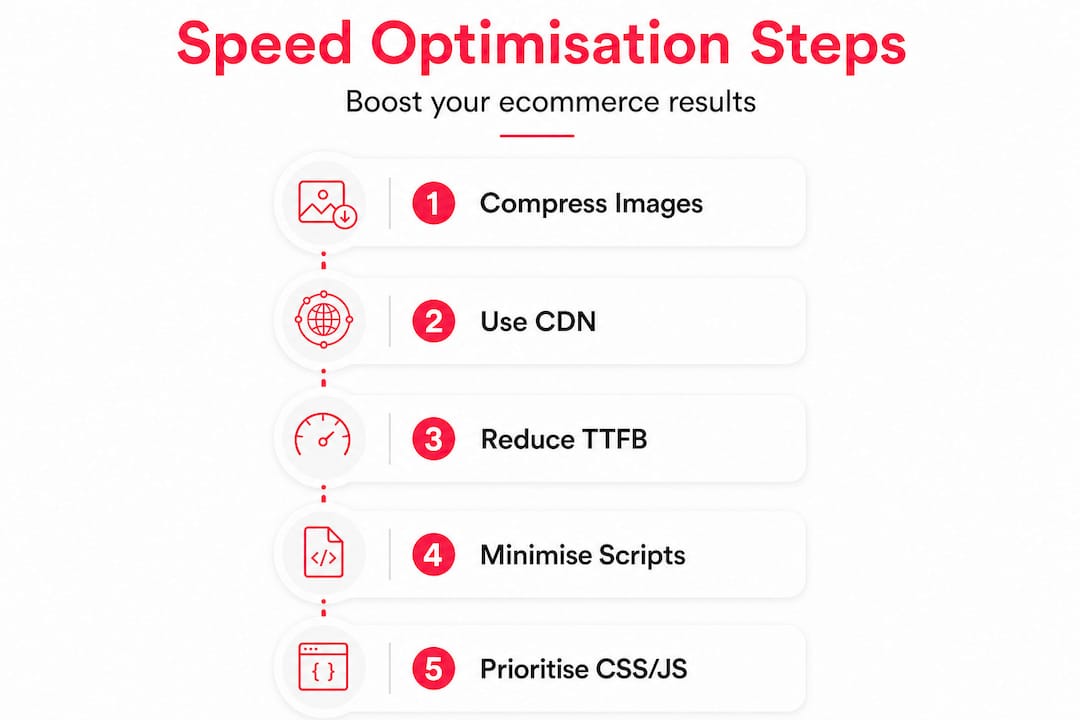
1. Compress and properly size images
Oversized images are the single most common culprit behind poor LCP scores. An uncompressed product image at 4MB will always fail the 2.5-second LCP threshold, regardless of how good your hosting is. Convert images to WebP format, implement responsive image sizing so browsers only download what they need, and use lazy loading for below-the-fold content. Our image optimisation tips walk through the technical specifics for ecommerce product catalogues, including bulk processing tools that scale with large inventory sets.

2. Leverage a CDN (Content Delivery Network)
A CDN stores copies of your static content (images, CSS, JavaScript) on servers physically close to your users. When a shopper in Manchester loads your site, they receive content from a nearby edge server rather than a data centre in Frankfurt or Virginia. Cloudflare’s edge caching stores these copies close to users, reducing the distance data travels and cutting load times significantly. For ecommerce sites with a UK customer base, this alone can shave one to two seconds from your LCP.
Go further with Cloudflare’s Tiered Cache, which reduces origin server load by using a hierarchy of edge tiers. Instead of every cache miss going back to your origin server, it first checks an upper-tier cache. This reduces recompute, lowers hosting costs, and further improves performance under high-traffic conditions such as sale events. For wider CDN best practices specific to ecommerce, including cache invalidation strategies for product pages that change frequently, the guidance is worth applying carefully.
A word of caution here: never cache your cart, checkout, or account pages via a CDN. These are dynamic, session-specific pages. Caching them incorrectly can show one customer another’s order details. It happens, and it is catastrophic for both GDPR compliance and customer trust.
3. Reduce server response time (TTFB)
If your TTFB is above 600ms, frontend optimisations alone will not rescue your LCP. You need to address the server side. Options include upgrading to a faster hosting tier, enabling PHP opcode caching (on Magento or WooCommerce), activating full-page cache correctly, and reducing database query load through indexing and query optimisation. Our Magento speed tips cover platform-specific techniques for reducing backend latency, particularly relevant for complex catalogue and B2B store setups.
4. Minimise and defer third-party scripts
Tag managers, live chat widgets, review platforms, analytics scripts — these all add weight. Audit every third-party script on your money pages and ask whether it is genuinely essential at page load, or whether it can load after the primary content. Use "asyncordefer` attributes on JavaScript where possible, and consider loading non-critical scripts only after user interaction.
5. Prioritise above-the-fold CSS and JS
Inline the critical CSS needed to render your above-the-fold content directly in the HTML, so the browser does not have to wait for an external stylesheet to load before showing something meaningful to the user. Split your JavaScript into smaller chunks (code splitting) so browsers download only what is needed for the current page view, rather than a single monolithic bundle that covers every feature across the entire store.
Pro Tip: Use Chrome DevTools’ Coverage tab to see exactly what percentage of your CSS and JavaScript is actually used on each page. On many ecommerce sites, over 60% of loaded CSS is unused on any given page view.
How to test, verify and avoid common mistakes
Optimisation without verification is guesswork. After each change, re-test the same money pages you baselined and compare before and after scores. Do this one change at a time where possible — making five simultaneous changes makes it impossible to know which one actually moved the needle.
Here is a structured approach to verifying your changes:
- Re-run Google PageSpeed Insights on the same URLs and record new LCP, INP, and CLS scores
- Check your TTFB in WebPageTest before and after server-side changes
- Monitor your CDN cache hit rate (visible in your Cloudflare or CDN dashboard) — aim for above 85%
- Track real-user data in Google Search Console under Core Web Vitals, which reflects actual field data rather than lab tests
Server-side and edge strategies that reduce TTFB and improve cache hit rates can directly affect LCP subcomponents, which means improvements to your backend have a measurable knock-on effect on your Google rankings and your user experience simultaneously.
Common mistakes to watch out for:
- Ignoring dynamic content: Product availability, personalised recommendations, and pricing that changes based on account type cannot be cached in the same way as static assets. These need dedicated strategies such as fragment caching or edge-side includes.
- Misconfiguring CDN rules: As noted above, caching session-based pages is a serious risk. Always maintain an explicit exclusion list for cart, checkout, and account pages.
- Optimising only for lab scores: Tools like Lighthouse run in controlled conditions. Real users on varied networks and devices may have a very different experience. Use Search Console’s real-user CWV data alongside lab results for a complete picture.
- Over-optimising at the cost of functionality: Stripping out features to hit a speed score is a false economy. Your website testing tips should include functional regression testing after any performance work, to ensure the store still converts correctly.
For deeper reading on the evolving standards, the Core Web Vitals guide for 2026 covers the latest changes to INP measurement and what they mean for interactive ecommerce pages.
What most speed guides miss: our take on sustainable optimisation
Here is our honest observation after working on ecommerce performance across Magento and Shopify builds for over 17 years: most speed guides are written with a passing grade in mind, not a commercial outcome.
They tell you to compress images and enable caching, and technically that is correct. But they rarely acknowledge the fundamental tension in ecommerce between raw speed and the functionality that makes a store actually work. Personalisation engines, stock-level messaging, dynamic pricing, loyalty scheme logic — all of these add processing overhead. Stripping them out to chase a PageSpeed score of 95 is not a viable business decision.
The brands we see getting this right are the ones treating performance as a continuous discipline, not a project. They have monitoring in place. They test changes. They understand which third-party tools are earning their weight and which are slowing the site with no measurable return. And critically, they understand their own platform well enough to apply optimisations that work with their architecture, not against it.
This is where ecommerce web design and speed intersect in a way that generic performance guides rarely address. The design decisions made at the build stage, choices about image treatment, font loading, component structure, determine the ceiling of what is achievable through optimisation alone. A well-designed Hyvä frontend on Magento, for example, gives you a structural speed advantage that no amount of post-launch patching on a legacy theme can replicate.
Sustainable speed gains come from three things: platform-appropriate architecture, ongoing monitoring, and the discipline to test before assuming. One-off fixes deliver one-off results. If you want speed to compound into better rankings, higher conversion rates, and lower paid acquisition costs over time, it needs to be embedded in how your team operates and how your agency partner supports you.
Take your ecommerce site further with expert support
Speed is one of the highest-ROI investments an ecommerce team can make, and it is also one of the areas where getting the technical detail right really matters.

At Big Eye Deers, we help growing and enterprise ecommerce brands design, build, and support stores that perform under real-world conditions. Whether you are on Shopify and looking for a performance-focused build, or running a complex Magento setup with custom catalogues and ERP integrations, we bring platform-specific expertise alongside practical performance strategy. As a specialist ecommerce agency with offices in Cardiff and Exeter, we work with UK retail brands who want speed, security, and commercial results built in from the start, not bolted on afterwards.
Frequently asked questions
What is a good website speed for ecommerce sites in the UK?
Google’s benchmark for a ‘good’ LCP is under 2.5 seconds, meaning your main content should load within that window to avoid a negative ranking and conversion impact.
Which pages should I optimise first for speed?
Prioritise your category, product, and checkout pages first, as these carry the most direct revenue impact and are where speed-related abandonment is most measurable.
What is LCP, and why is it important?
LCP (Largest Contentful Paint) measures how quickly the main visible content of a page loads for a user, and a good LCP score of under 2.5 seconds is a strong signal for both Google rankings and shopper confidence.
Should I use a CDN for my ecommerce site?
Yes. Cloudflare’s edge caching works by storing copies of your content close to your shoppers, which reduces server load and meaningfully cuts page load times across the UK.
How much can slow speeds really cost my store?
A one-second delay in page load time can reduce conversion rates by 7%, which compounds into significant revenue loss across a full trading year, particularly during high-traffic periods like seasonal sales.
Recommended



Adobe Commerce (Magento)
Formerly known as Magento, Adobe Commerce is built for complex catalogues, integrations, and long term growth. We design and develop stable, scalable stores that support demanding eCommerce requirements, including multi-store setups, complex pricing, and Hyva based performance improvements.

Bespoke Build
We design and build custom eCommerce platforms for businesses with complex workflows, integrations, or non standard requirements. Built from scratch around your business needs using Laravel and modern architectures.

Working with brands across the UK from our offices in Cardiff and Exeter, you deal directly with a senior team of designers and developers specialising in Shopify, Magento, WordPress and bespoke eCommerce platforms.
We focus on commercial outcomes. Better conversion rates, strong SEO foundations and eCommerce platforms that continue to improve long after launch.