Moving a Magento site: your complete 2026 guide
TL;DR:
- Migrating a Magento store involves transferring data, files, and configurations carefully to avoid traffic loss and broken integrations. Proper preparation, including backups and staging tests, ensures a smooth transition and better store performance. Post-migration validation and accurate redirect mapping are crucial to maintain SEO and user experience.
Moving a Magento site is defined as the process of transferring your store’s database, files, configurations, and integrations from one server or environment to another. In the industry, this is formally called Magento site migration, and it covers everything from a simple hosting change to a full Magento 1 to Magento 2 upgrade. Get it wrong and you risk lost orders, broken integrations, and a significant drop in organic traffic. Get it right, with a phased plan and the correct tooling, and your store comes back online faster and in better shape than before. This guide walks you through every stage, from prerequisites to post-launch SEO recovery.
What prerequisites and tools do you need to move a Magento site?
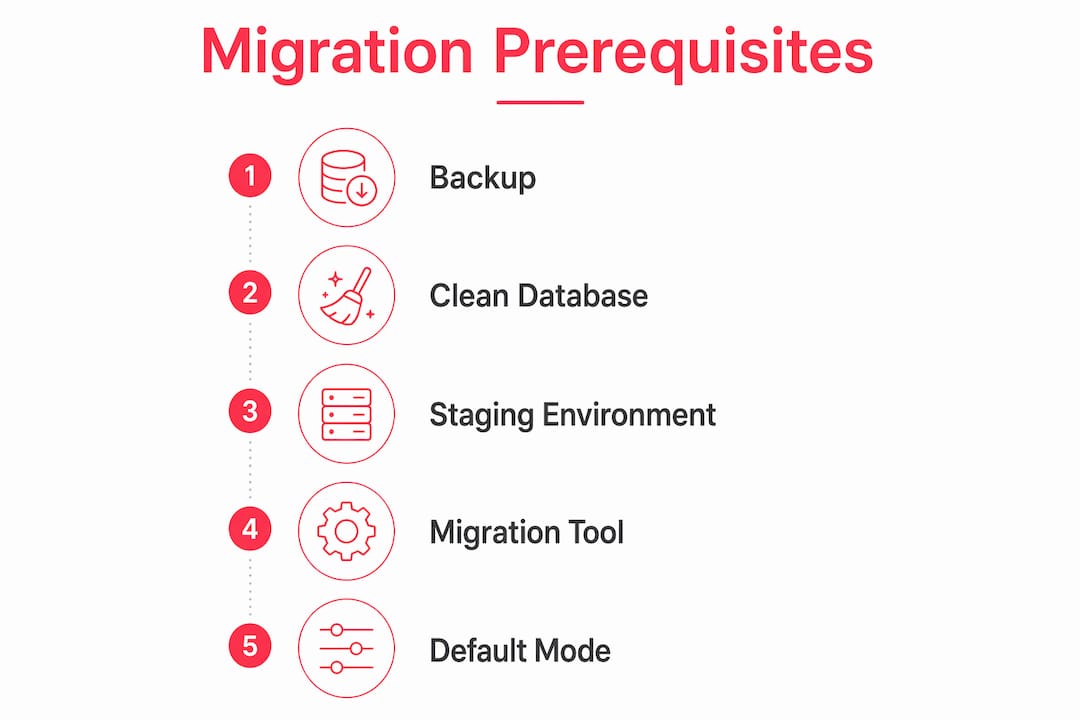
Preparation is the difference between a clean migration and a costly recovery job. Before you transfer a single file, you need a complete backup of your database and all media assets. That means your pub/media directory, your theme files, and any custom module code. A Magento 2 backup plugin gives you a reliable, automated way to capture these assets before you begin.

The primary tool for a Magento 1 to Magento 2 migration is the Adobe Data Migration Tool, which runs via the command line interface (CLI). It handles settings, core data, and incremental changes through three distinct phases. Your new server must meet Magento 2’s PHP version requirements, have MySQL access configured, and be running in default mode, not developer mode, before you start.
A staging environment is not optional. Run your full migration on staging first, validate every integration, and only then schedule the production move. Before you begin, audit the following:
- All third-party extensions and whether Magento 2 equivalents exist
- Custom theme files and any overrides
- ERP, PIM, and payment gateway integrations
- Existing URL structure and redirect requirements
- Customer group configurations and tiered pricing rules
Pro Tip: Clean your Magento 1 database before migration. Remove dirty data such as duplicate records, broken product images, expired promotional rules, and old order quotes. Migrating dirty data transfers every problem directly into your new environment.
| Prerequisite | Why it matters |
|---|---|
| Full database and file backup | Recovery point if migration fails at any stage |
| Staging environment | Validates migration before production go-live |
| PHP and MySQL compatibility check | Prevents tool errors during data transfer |
| Extension audit | Identifies gaps before go-live, not after |
| URL and redirect mapping | Protects organic search rankings post-launch |
How do you execute the Magento migration phases step by step?
The Adobe Data Migration Tool runs in three ordered phases: settings, data, and delta. Each phase includes an integrity check, a data transfer, and a volume verification. You cannot skip or reorder them.
-
Migrate settings. This phase transfers store configurations, website setups, and system settings. Settings migration takes approximately 10 minutes and is the lightest part of the process. Run it first to establish the correct environment for data to land in.
-
Migrate core data. This is the heavy phase. Products, customers, orders, and CMS content all transfer here. Core data migration takes around 9 hours, excluding URL rewrites, which account for a significant portion of data volume on large catalogues. Plan your maintenance window accordingly.
-
Run delta mode. After the initial data transfer, your Magento 1 store will have continued processing orders and customer activity. Delta mode captures those incremental changes and applies them to Magento 2. Run delta mode as close to your go-live moment as possible to minimise data gaps.
The CLI commands follow this sequence:
bin/magento migrate:settings <config-file>
bin/magento migrate:data <config-file>
bin/magento migrate:delta <config-file>
Each command runs its own integrity check first. If the integrity check fails, the tool stops and reports the conflicting table structures. Do not force past these errors. They indicate a genuine mismatch between your Magento 1 source and Magento 2 target that needs resolving before data transfer continues.
Pro Tip: Magento must run in default mode during migration. Running in developer mode triggers integrity check errors that halt the process. Switch modes before you start and do not change them mid-migration.
What post-migration tasks keep your Magento store running properly?
Once data transfer completes, the work is not finished. Post-migration tasks are what separate a store that goes live cleanly from one that limps online with broken functionality. Work through these in order:
- Disable Magento 1 cron jobs and stop any scheduled tasks on the old server to prevent data conflicts.
- Activate Magento 2 cron jobs to restore scheduled indexing, email sending, and catalogue price rules.
- Flush all caches using
bin/magento cache:flushto clear any stale data from the migration process. - Reindex all data with
bin/magento indexer:reindexto rebuild product, category, and search indexes on the new environment. - Update DNS and load balancer settings to point traffic to the new server. Allow for DNS propagation time, which can take up to 48 hours depending on TTL settings.
- Warm up the page cache by crawling key category and product pages before you announce the launch.
- Test order processing end to end. Place a real test order, process a refund, and confirm payment gateway responses are correct.
- Validate user account logins and check that customer order history has migrated accurately.
After launch, check your Magento 2 store performance against your pre-migration benchmarks. Any regression in page load times or conversion rate needs investigating immediately, not at the next sprint.
How do you avoid common Magento migration mistakes?
Most migration failures are predictable. The same mistakes appear repeatedly, and all of them are avoidable with proper planning.
Skipping 301 redirect mappings for every old URL is the number one cause of organic traffic loss during a Magento site relocation. A store with thousands of product pages requires an equivalent number of redirects to preserve its search rankings. Map every URL before go-live, not after you notice the traffic drop.
- Do not migrate in developer mode. The integrity check will fail and the migration tool will stop. Switch to default mode first.
- Clean the database before you start. Migrating dirty data transfers every problem to your new site. Remove logs, expired quotes, and redundant promotional rules from Magento 1 before running the tool.
- Map every 301 redirect. Missing redirects destroy organic rankings that took years to build. Use a crawl tool to capture your full URL inventory before migration begins.
- Schedule downtime outside peak retail periods. Avoid Fridays, weekends, and any promotional periods. A Tuesday morning at 2AM is far less damaging than a Saturday afternoon.
- Build a rollback plan. Know exactly how you will revert to Magento 1 if a critical issue appears post-launch. Your backup from the preparation phase is your safety net. Test that it restores correctly before migration day.
A phased migration approach reduces risk significantly. Move content before storefront, or migrate products before customer accounts, to validate each layer before adding complexity.
What SEO and performance best practices apply after moving your Magento store?
A successful Magento site relocation does not end at go-live. Search engines need time to recrawl and reindex your new environment, and that window is where rankings are most vulnerable.
-
Verify all meta titles, descriptions, and canonical tags have transferred correctly. A bulk crawl with a tool such as Screaming Frog will surface any missing or duplicated tags within minutes.
-
Submit a fresh XML sitemap to Google Search Console immediately after launch. This signals the new URL structure to Google and accelerates recrawling.
-
Monitor crawl errors and 404 pages in Google Search Console for at least 30 days post-launch. New 404s indicate missing redirects that need fixing urgently.
-
Benchmark traffic and conversion rate against your pre-migration baseline. Any drop beyond normal variance in the first two weeks warrants immediate investigation.
-
Check structured data for products, breadcrumbs, and reviews. Structured data errors after migration are common and affect rich result eligibility in search.
Pro Tip: Follow post-launch SEO best practices specific to Magento to recover rankings faster. Prioritise fixing crawl errors and redirect gaps in the first 72 hours, when Google’s recrawl activity is highest.
Caching configuration on the new server also deserves attention. Magento’s built-in full-page cache, combined with a reverse proxy such as Varnish, delivers the fastest response times. Confirm your hosting environment supports Varnish and that it is correctly configured before you go live.
| SEO task | Timing |
|---|---|
| Submit XML sitemap to Google Search Console | Day 1 post-launch |
| Crawl for 404 errors and missing redirects | Day 1–3 post-launch |
| Verify structured data and canonical tags | Day 1–3 post-launch |
| Monitor traffic and conversion rate | Days 1–30 post-launch |
| Review crawl budget and index coverage | Week 2–4 post-launch |
Reindexing and DNS propagation add time beyond the core data transfer window. Build adequate buffers into your downtime estimate so you are not rushing final checks under pressure.
Key takeaways
A successful Magento migration requires a clean database, a phased execution using the Adobe Data Migration Tool, and thorough post-launch validation covering SEO, caching, and order processing.
| Point | Details |
|---|---|
| Clean data before migrating | Remove logs, expired quotes, and redundant rules from Magento 1 before running the tool. |
| Follow the three-phase order | Run settings, then data, then delta mode. Skipping or reordering phases causes errors. |
| Plan for 9+ hours of data transfer | Core data migration takes around 9 hours; add time for reindexing and DNS propagation. |
| Map every 301 redirect | Missing redirects are the leading cause of organic traffic loss after a site relocation. |
| Validate post-launch for 30 days | Monitor crawl errors, 404 pages, and conversion rate for at least a month after go-live. |
What I have learned from moving Magento sites in the real world
The technical steps are well documented. What catches teams out is everything around the edges.
The biggest underestimation I see is downtime. Developers quote the 9-hour data migration figure and forget that reindexing, DNS propagation, cache warming, and end-to-end order testing all add to that total. A migration that looks like a 10-hour job on paper regularly runs to 16 hours in practice. Build that buffer in from the start, and tell your stakeholders the honest number.
The second issue is cross-functional readiness. A Magento migration touches your ERP team, your marketing team, your payment provider, and your logistics integrations. I have seen technically perfect migrations stall for hours because a payment gateway API key had not been updated on the new server, or because a Klaviyo webhook was still pointing at the old domain. Get every team in the room before migration day, not on it.
My honest advice on timing: if your current Magento 1 store is still generating revenue and you have not yet built a Magento 2 equivalent on staging, do not rush the migration to hit an arbitrary deadline. A poorly executed move costs more in lost revenue and recovery time than a few extra weeks of preparation. For complex B2B Magento builds in particular, the integration layer alone can take longer to validate than the data migration itself.
The final check I always insist on is a real customer journey test. Not a developer clicking through the front end, but an actual test purchase, from product search to checkout confirmation, on the new environment before DNS switches over. That single test has caught more critical issues than any automated check I have run.
— Steve
How Bigeyedeers supports your Magento migration
Moving a Magento store is a significant technical undertaking, and the margin for error is narrow when revenue is at stake. Bigeyedeers is a UK-based ecommerce agency with over 17 years of Magento experience, covering everything from Magento Open Source builds to full Adobe Commerce deployments with ERP integrations and multi-store setups.

We handle Magento migrations end to end, from pre-migration audits and database cleaning through to post-launch SEO monitoring and performance tuning. Whether you are moving to a new server, upgrading from Magento 1, or rebuilding on a Hyvä frontend, our team manages the process so your store stays secure, your rankings hold, and your customers notice nothing but an improvement. Get in touch to discuss your migration requirements.
FAQ
How long does a Magento site migration take?
Settings migration takes approximately 10 minutes, but core data transfer takes around 9 hours, excluding URL rewrites. Add time for reindexing, DNS propagation, and post-launch testing, and a full migration typically requires a 14–18 hour maintenance window.
What is the Adobe Data Migration Tool?
The Adobe Data Migration Tool is the official CLI utility for migrating data from Magento 1 to Magento 2. It runs in three phases: settings, data, and delta, each with built-in integrity checks and volume verification.
Will moving my Magento site affect my SEO rankings?
A migration can cause temporary ranking drops if 301 redirects are missing or meta data does not transfer correctly. Mapping every old URL to its new equivalent and submitting a fresh XML sitemap to Google Search Console immediately after launch minimises the impact.
Do I need a staging environment to migrate Magento?
A staging environment is essential. Running the full migration on staging first lets you validate data integrity, test integrations, and identify errors before they affect your live store and customers.
What should I do if the migration integrity check fails?
An integrity check failure means the Adobe Data Migration Tool has found a structural mismatch between your Magento 1 source and Magento 2 target. Do not force past the error. Resolve the conflicting table structures first, then rerun the check before proceeding with data transfer.
Recommended



Adobe Commerce (Magento)
Formerly known as Magento, Adobe Commerce is built for complex catalogues, integrations, and long term growth. We design and develop stable, scalable stores that support demanding eCommerce requirements, including multi-store setups, complex pricing, and Hyva based performance improvements.

Bespoke Build
We design and build custom eCommerce platforms for businesses with complex workflows, integrations, or non standard requirements. Built from scratch around your business needs using Laravel and modern architectures.
Working with brands across the UK from our offices in Cardiff and Exeter, you deal directly with a senior team of designers and developers specialising in Shopify, Magento, WordPress and bespoke eCommerce platforms.
We focus on commercial outcomes. Better conversion rates, strong SEO foundations and eCommerce platforms that continue to improve long after launch.