How to download Magento 2: a 2026 developer’s guide
TL;DR:
- Magento 2 is an open-source platform that requires Composer for reliable downloading and dependency management. Environment readiness, especially matching PHP and MySQL versions, is essential to prevent installation failures. Manual downloads and GitHub cloning are suitable only for testing, not for production environments.
Magento 2 is defined as an open-source eCommerce platform whose source code you acquire via Composer, the official PHP dependency manager endorsed by Adobe for all production installations. Magento Open Source is free to download under the OSL 3.0 licence, with no licensing fees attached. Costs arise only from infrastructure, hosting, and support. Adobe’s official position is clear: Composer is the correct method to download Magento 2, manage its dependencies, and keep the platform maintainable over time. Getting this first step right determines everything that follows.
What are the system requirements to download Magento 2?
Environment preparation is more critical than the download command itself. Failing to meet PHP, MySQL, or search engine specs causes dependency errors that no amount of retrying will fix. Adobe only supports server configurations that match their tested dependency tables, and version mismatches produce issues that standard troubleshooting cannot resolve.
Magento 2.4.8 requires PHP 8.3 or 8.4, MySQL 8.4 or MariaDB 11.4, OpenSearch 2.19, Composer 2.9.3 or above, and Redis or Valkey 8 for cache. The minimum RAM for a production server is 4 GB. These are not suggestions. Adobe’s validation checks your stack before allowing the install to proceed.
| Component | Magento 2.4.8 requirement |
|---|---|
| PHP | 8.3 or 8.4 |
| MySQL | 8.4 |
| MariaDB | 11.4 |
| OpenSearch | 2.19 |
| Composer | 2.9.3+ |
| Cache layer | Redis or Valkey 8 |
| RAM (production) | 4 GB minimum |
Pro Tip: Keep your server stack updated before you attempt any Magento download. A mismatched PHP or MySQL version is the single most common reason installs fail at the dependency resolution stage.
For a broader view of what Magento Open Source offers beyond the install, it is worth understanding the platform’s architecture before you commit to a server configuration.
How to download Magento 2 using Composer
Adobe mandates Composer as the primary installation method for Magento 2. Composer manages all dependencies automatically, resolves version conflicts, and gives you a clean, reproducible codebase from day one. The full download on a compliant server typically takes 5–10 minutes, with the complete installation finishing in around 30 minutes.
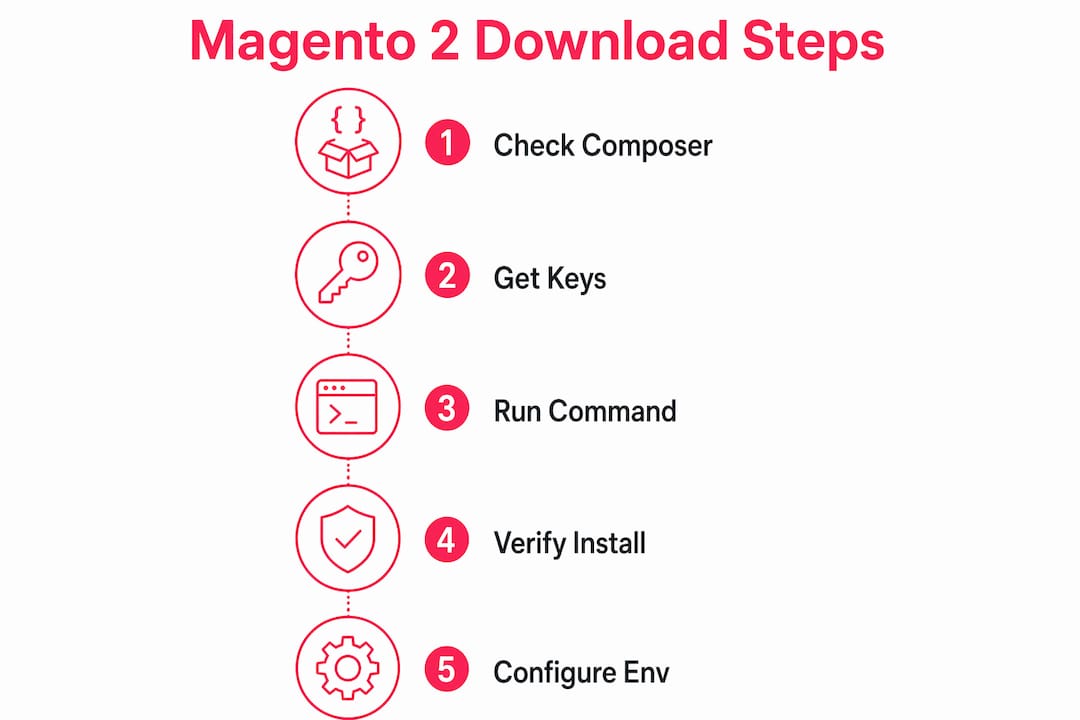
Step-by-step Composer download
- Verify Composer is installed. Run
composer --versionin your terminal. You need version 2.x. If Composer is absent, install it from getcomposer.org. - Generate your Adobe Marketplace access keys. Log into your Adobe account, navigate to Marketplace, and create a set of access keys under “My Profile.” You will receive a public key and a private key.
- Run the create-project command. Execute the following in your target directory:
composer create-project --repository-url=https://repo.magento.com/ magento/project-community-edition=2.4.8 . - Enter your credentials when prompted. Composer asks for a username and password. Enter your public key as the username and your private key as the password.
- Wait for dependency resolution. Composer fetches Magento’s core packages and all third-party libraries. You will see package names scrolling through the terminal. This is normal.
- Confirm the download. Once complete, your directory contains the full Magento codebase, ready for the setup wizard or CLI installation.
Pro Tip: Pin an exact version number in your create-project command rather than using a wildcard. This prevents Composer from pulling in a release you have not tested, which matters greatly on production servers.
| Step | Action |
|---|---|
| 1. Check Composer | Run composer --version; upgrade to 2.x if needed |
| 2. Get access keys | Generate public and private keys in Adobe Marketplace |
| 3. Run command | Use composer create-project with the repo URL and version |
| 4. Authenticate | Public key = username; private key = password |
| 5. Resolve dependencies | Composer fetches all packages automatically |
| 6. Confirm codebase | Verify directory contents before running setup |

A critical nuance catches many developers out. The Composer password is not your Adobe login password. It is the private key generated specifically in Magento Marketplace Access Keys. Entering your Adobe account password here produces an “access denied” error every time.
What alternative methods exist to download Magento 2?
Two alternatives to Composer exist: manual archive download and GitHub cloning. Both have legitimate use cases, but neither is suitable for production.
Manual archive download
Adobe Marketplace provides a .zip archive of Magento 2 for developers working in offline or firewalled environments. The process involves downloading the archive, uploading it to your server, extracting it, and setting file permissions manually. This works for testing or air-gapped environments where Composer cannot reach external repositories.
The drawback is significant. Manual archive downloads skip modern dependency management, forcing you to resolve library conflicts by hand and making future updates far more difficult. Adobe discourages this method for production installs precisely because maintenance becomes a manual, error-prone process.
GitHub cloning
Cloning the Magento 2 repository from GitHub is the correct approach for developers contributing to Magento core or testing unreleased features. It gives you access to the latest commits and branch history. For a standard store build, however, it introduces instability because you are working with code that may not yet be production-ready.
- Composer: Best for all production and staging environments. Handles dependencies, supports version pinning, and simplifies upgrades.
- Manual archive: Acceptable for offline testing or environments with strict network restrictions. Not recommended for production.
- GitHub clone: Suitable for core contributors and pre-release testing only. Not suitable for live store builds.
Pro Tip: Reserve manual archive downloads for isolated testing environments. If you are building or maintaining a live store, Composer is the only method that keeps your upgrade path clean.
For ongoing security after your install, understanding Magento security patches is the logical next step. Keeping your codebase current is not optional on a live platform.
What common issues occur when downloading Magento 2?
Most download failures trace back to environment problems, not the download command itself. Knowing what to look for before you start saves significant time.
- Authentication errors. The most frequent issue. Developers enter their Adobe account password instead of their Marketplace private key. The fix is straightforward: return to Adobe Marketplace, copy the private key exactly, and re-enter it when Composer prompts for a password.
- Failed dependency resolution. Composer reports unresolvable conflicts when your PHP or MySQL version does not match the Magento 2.4.x requirements. Check your stack against the system requirements table before retrying.
- Composer version mismatch. Magento 2.4.8 requires Composer 2.9.3 or above. Running an older Composer version produces cryptic errors. Run
composer self-updateto resolve this. - File permission errors. After download, Magento requires specific ownership and permission settings on directories like
var/,pub/, andgenerated/. Set these before running the setup wizard. - Network or firewall restrictions. Corporate or shared hosting environments sometimes block outbound connections to
repo.magento.com. If Composer hangs or times out, check with your hosting provider or use a manual archive as a temporary workaround.
Mixing unsupported dependency versions results in issues that cannot be resolved by standard troubleshooting. Adobe’s 2026 documentation is explicit on this point. Run a full environment check before you attempt the download, not after it fails.
For Magento SEO setup after installation, Magento SEO automation tools can help you build visibility from day one. Getting the technical foundation right first makes every subsequent optimisation more effective.
Key takeaways
Composer is the only reliable method to download Magento 2 for production, and environment preparation determines whether the download succeeds or fails.
| Point | Details |
|---|---|
| Use Composer for production | Adobe mandates Composer as the official download method; it handles all dependencies automatically. |
| Match your stack exactly | Magento 2.4.8 requires PHP 8.3 or 8.4, MySQL 8.4, and Composer 2.9.3+; mismatches cause unresolvable errors. |
| Use the correct credentials | The Composer password is your Marketplace private key, not your Adobe account password. |
| Reserve manual methods | Archive downloads and GitHub cloning suit offline testing only; avoid them for live builds. |
| Prepare before you download | Environment checks before the download prevent the majority of installation failures. |
Why environment prep beats the download command every time
Here is something I have seen trip up experienced developers repeatedly. Everyone focuses on the Composer command itself, memorising flags and version strings, when the real work happens in the hour before you run a single line. I have watched installs fail on servers where the developer had the command exactly right but was running PHP 8.1 on a stack that needed 8.3. Composer told them nothing useful. The error messages pointed everywhere except at the actual problem.
My honest advice: treat the system requirements table as a pre-flight checklist, not a reference document. Tick every item off before you open a terminal. PHP version, MySQL version, Composer version, RAM, OpenSearch. All of it. First-time environment setup adds 1–2 hours to the process, and that time is well spent. Rushing past it costs you far more later.
The other thing I would stress is keeping your Adobe Marketplace access keys somewhere secure and accessible. I have seen projects stall because a developer left the company and the keys were stored only in their local environment. Keep them in a shared password manager your team controls. It sounds obvious, but it is the kind of thing that only becomes obvious after it goes wrong.
If you are using Docker for local development, which I strongly recommend, tools like the official Magento Cloud Docker configuration give you a pre-built stack that matches production. It removes the environment variable entirely from your local testing. That is a significant advantage when you are iterating quickly.
— Steve
Magento 2 installation support from Bigeyedeers
Getting Magento 2 downloaded and installed correctly is the foundation of every high-performing store. Bigeyedeers has spent over 17 years building and supporting Magento platforms for growing and enterprise retail brands across the UK.

Our team handles the full process: environment configuration, Composer-based installation, security patching, and ongoing platform support. Whether you are starting a new Magento build or bringing an existing store up to the 2.4.8 standard, we know exactly what a production-ready setup looks like. Take a look at our Magento web design services to see how we approach builds from the ground up, or meet the team behind the work.
FAQ
Is Magento 2 free to download?
Magento Open Source is free to download under the OSL 3.0 licence, with no licensing fees. Costs come from hosting, infrastructure, and any support or development services you use.
What is the official Magento 2 download link?
Adobe’s official repository is https://repo.magento.com/, accessed via the Composer create-project command. You need Adobe Marketplace access keys to authenticate.
How long does a Magento 2 download take?
The Composer download takes 5–10 minutes on a prepared server. The full installation, including setup, takes around 30 minutes. First-time environment setup adds 1–2 hours depending on your experience.
What PHP version does Magento 2.4.8 require?
Magento 2.4.8 requires PHP 8.3 or 8.4. Running an unsupported PHP version causes dependency resolution failures that cannot be fixed without upgrading the server environment.
Can I download Magento 2 without Composer?
Yes, via a manual archive from Adobe Marketplace or by cloning the GitHub repository. Adobe discourages both methods for production use because they lack automated dependency management and make upgrades significantly harder.
Recommended



Adobe Commerce (Magento)
Formerly known as Magento, Adobe Commerce is built for complex catalogues, integrations, and long term growth. We design and develop stable, scalable stores that support demanding eCommerce requirements, including multi-store setups, complex pricing, and Hyva based performance improvements.

Bespoke Build
We design and build custom eCommerce platforms for businesses with complex workflows, integrations, or non standard requirements. Built from scratch around your business needs using Laravel and modern architectures.

Working with brands across the UK from our offices in Cardiff and Exeter, you deal directly with a senior team of designers and developers specialising in Shopify, Magento, WordPress and bespoke eCommerce platforms.
We focus on commercial outcomes. Better conversion rates, strong SEO foundations and eCommerce platforms that continue to improve long after launch.