The role of Figma in web projects: a 2026 guide
TL;DR:
- Figma is a cloud-based design and prototyping platform that now standardizes web interface development. It enhances collaboration with real-time editing, comments, and permissions, reducing version conflicts. Prototyping in Figma minimizes risks and costs by enabling early usability testing and stakeholder feedback before coding.
Figma is defined as a cloud-based vector design and prototyping platform that integrates design, collaboration, and developer handoff into a single shared workspace. The role of Figma in web projects has shifted from optional tool to industry standard, with UI/UX teams across agencies and in-house departments now treating it as the default environment for planning and building web interfaces. At Bigeyedeers, we use Figma to map user journeys, build wireframes, and define interface systems before a single line of code is written. That front-loaded clarity is what separates projects that run smoothly from those that spiral into rework.
How does Figma’s collaboration model enhance web project workflows?
Figma’s real-time multiplayer editing removes the single biggest source of friction in traditional design workflows: version conflicts. With desktop-based tools, designers email files, developers open stale copies, and stakeholders comment on screenshots that no longer reflect the current design. Figma eliminates that entirely. Centralised Figma files replace fragmented communication channels, making design decisions visible and traceable for every team member.
The practical benefits go beyond file management. Designers, developers, and project managers all work inside the same document simultaneously. Stakeholders can leave comments directly on frames rather than firing off emails. Permissions control who can edit, who can view, and who can inspect code values, which keeps sensitive brand assets protected without blocking progress.
Key collaboration advantages Figma delivers on web projects:
- Real-time co-editing means no two people ever work on conflicting file versions.
- In-canvas commenting threads feedback to specific design elements, not vague email chains.
- Granular permissions let agencies share live prototypes with clients without exposing the full file.
- Shared component libraries keep brand colours, typography, and UI patterns consistent across every page.
- Figma’s multiplayer model has proven reliable at scale, with teams reporting fewer than 5 outages over three years of continuous use.
That reliability matters on commercial web projects where downtime in the design environment delays the entire delivery pipeline.
Pro Tip: Set up a dedicated “handoff-ready” page inside your Figma file where only finalised frames live. This gives developers a clean, unambiguous starting point and stops them from accidentally building from a work-in-progress frame.
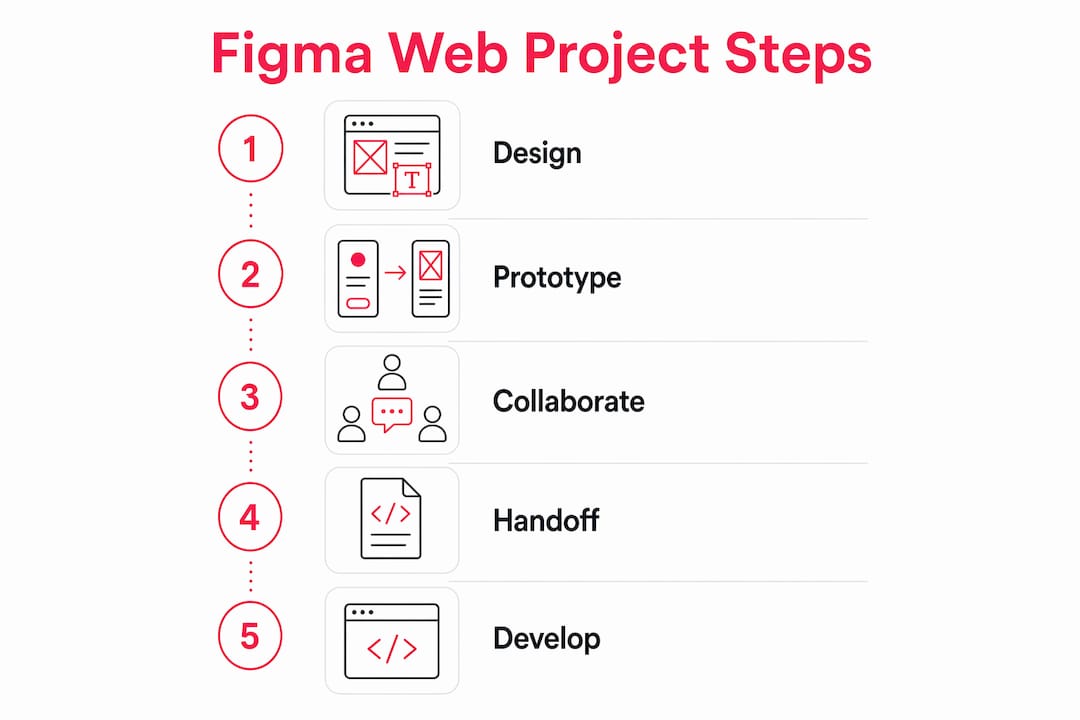
In what ways does prototyping in Figma lower web project risks and costs?
Prototyping in Figma reduces project risk by enabling early testing of user flows and interactions before any development work begins. Frames connect through interactions and animations, producing a clickable model that behaves like the finished site. Clients and stakeholders can navigate the prototype on any device, which surfaces usability problems at the cheapest possible moment to fix them.
The alternative is discovering those problems in a browser after a developer has spent two weeks building the wrong flow. Prototypes allow usability testing with clients and real users before any code is written, directly saving rework time and aligning stakeholder expectations with what the team is actually building.
Specific risk reduction benefits include:
- Flow validation confirms that navigation logic makes sense before it is coded.
- Interaction testing exposes animation and transition decisions that look good in static frames but feel wrong in motion.
- Stakeholder sign-off on a prototype is far more meaningful than approval of a flat image, because the client has actually used the design.
- Edge case discovery happens during prototype review, not during QA, which is where fixing them costs the most.
Prototyping in Figma prevents costly development changes and timeline delays by surfacing misalignments early. That is not a minor efficiency gain. On a mid-sized ecommerce build, catching a flawed checkout flow in Figma rather than in staging can save days of developer time and avoid a missed launch date.
Designing with a single source of truth in Figma also eradicates guesswork during development. When everyone references the same prototype, there is no ambiguity about what the finished product should do.
What role does Figma’s developer handoff play in ensuring design fidelity?
Figma’s Dev Mode gives developers direct access to design specifications without needing to ask a designer for measurements. CSS values, spacing tokens, asset exports, and typography details are all inspectable from within the file. That removes the back-and-forth that typically inflates project timelines and introduces human error.

Dev Mode is critical for complex web application projects where pixel accuracy and consistent spacing directly affect user experience. The VS Code extension takes this further, pulling design tokens and component specs into the developer’s editor without switching context. That integration alone reduces the number of “what size is this padding?” queries that interrupt a designer’s focus.
Best practices for clean developer handoff in Figma:
- Annotate edge cases directly on frames using sticky notes or a dedicated annotation component library.
- Name every layer using a consistent convention that mirrors your CSS class naming structure.
- Export assets in the correct formats (SVG for icons, WebP for images) directly from the file rather than through a separate export step.
- Document interactive states (hover, focus, error, disabled) as separate frames so developers build complete components, not just the default state.
Pro Tip: Create a “states” section beside every interactive component in your Figma file. Show the default, hover, active, focus, and error states in a single row. Developers will thank you, and QA will catch fewer issues.
The accuracy that Dev Mode enables is particularly valuable on ecommerce web design projects, where product grids, filter panels, and checkout flows involve dozens of interactive states that must behave consistently across breakpoints.
How does a developer-first design mindset in Figma improve web project outcomes?
Thinking in systems rather than individual screens is the single biggest shift a web designer can make in Figma. A developer-first approach means setting global spacing, colour, and typography rules as Variables before designing a single frame. Figma Variables map directly to CSS custom properties, making the design file a reliable blueprint rather than a loose reference.
The practical difference is significant. When a brand updates its primary colour, a designer with Variables set up changes one value and the entire file updates. A designer without Variables changes hundreds of individual elements manually, introducing inconsistencies that developers then have to chase through the codebase.
| Design approach | Developer experience | Maintenance cost |
|---|---|---|
| Variables mapped to CSS tokens | Developers reference predictable values | Low: one change updates everywhere |
| Hardcoded colours and spacing | Developers guess or ask constantly | High: every update risks inconsistency |
| No component system | Developers rebuild UI patterns from scratch | Very high: duplication across the codebase |
| Reusable components with variants | Developers implement once, reuse everywhere | Low: consistent and well-documented |
Auto Layout frames in Figma directly represent CSS flexbox containers. That means a developer reading an Auto Layout frame understands the spacing and positioning logic immediately, without translation. Auto Layout as a visual flexbox representation is one of the most underused features in web design workflows, yet it is the one that most directly reduces developer interpretation errors.
Poor use of Variables and components creates what practitioners call “token debt.” Mapping design tokens to CSS custom properties avoids this problem by keeping the design system and the codebase in sync. Token debt compounds over time: the longer a team ignores it, the more expensive future updates become.
Responsive design benefits directly from Figma’s Multi-Edit feature. Multi-Edit enables concurrent updates across breakpoints, preventing the inconsistencies that arise when a designer updates the desktop frame but forgets the mobile version. That consistency reduces the pixel-pushing time developers spend reconciling differences between breakpoints.
Pro Tip: Build your component library before you start designing pages. Spending two days on a solid component set saves two weeks of inconsistency fixes later in the project.
A well-structured step-by-step web design process always begins with the design system, not the homepage. Figma makes that discipline practical rather than aspirational.
Key takeaways
Figma’s value in web projects comes from combining real-time collaboration, prototype-driven risk reduction, and a developer-first component system into one shared environment.
| Point | Details |
|---|---|
| Collaboration without conflicts | Real-time multiplayer editing removes version control issues and keeps all teams aligned. |
| Prototypes prevent rework | Testing user flows in Figma before coding catches expensive problems at the cheapest moment. |
| Dev Mode accelerates handoff | Developers access CSS values, spacing, and assets directly, reducing back-and-forth queries. |
| Variables prevent token debt | Mapping Figma Variables to CSS custom properties keeps design and code in sync long-term. |
| Systems thinking scales projects | Building reusable components and Auto Layout frames reduces inconsistency and maintenance cost. |
Why Figma changed how I think about web project delivery
I have worked on web projects where the design lived in a shared drive, the feedback came by email, and the developer received a PDF of screenshots. That is not an exaggeration. The amount of time lost to “which version is current?” and “what did the client actually approve?” was staggering.
Figma did not just speed up that process. It changed the nature of the conversation. When a client can click through a prototype and say “this button should go here,” you have a shared reference point. When a developer can inspect a frame and see the exact padding value, you have eliminated an entire category of misunderstanding.
What I find most interesting is how Figma has forced designers to think more like developers. The discipline of setting up Variables before designing, building components before building pages, and using Auto Layout instead of fixed positioning. These are not just Figma best practices. They are habits that produce better products because they reflect how the web actually works.
The teams I see struggling with Figma are the ones treating it like a digital sketchpad. They design beautiful screens with no component system, no Variables, and no thought for how a developer will interpret the file. The handoff becomes a negotiation rather than a transfer. That is avoidable, and the fix is front-loading the system setup rather than bolting it on at the end.
My advice: invest the first day of any web project in building the Figma foundation. Colour Variables, typography styles, spacing tokens, and a core component set. That day pays back tenfold before the project is done.
— Steve
How Bigeyedeers uses Figma to deliver better web projects
At Bigeyedeers, Figma sits at the centre of every web project we take on, from initial wireframes through to final developer handoff. We use it to plan user journeys, define interface systems, and give clients a prototype they can actually interact with before development begins. That process is central to how we design and build ecommerce sites on Magento and Shopify that perform from day one.

Our Cardiff and Exeter teams use Figma’s collaboration tools to keep designers, developers, and clients aligned throughout the project. If you are building or rebuilding a web project and want a team that treats design as a system rather than a set of images, talk to Bigeyedeers about how we approach it.
FAQ
What is Figma used for in web projects?
Figma is used for wireframing, UI design, prototyping, and developer handoff in web projects. It replaces multiple separate tools by combining all of these functions in a single cloud-based workspace.
How does Figma improve collaboration between designers and developers?
Figma gives developers direct access to design specifications, CSS values, and assets through Dev Mode, removing the need for manual handoff documents. Real-time multiplayer editing keeps designers and developers working from the same source of truth simultaneously.
What are Figma Variables and why do they matter?
Figma Variables store global design values such as colours, spacing, and typography that map directly to CSS custom properties. Using them correctly prevents token debt and makes future design updates consistent across the entire file and codebase.
Does Figma support responsive web design?
Figma supports responsive design through Auto Layout, which mirrors CSS flexbox behaviour, and Multi-Edit, which applies changes across multiple breakpoints at once. These features reduce inconsistencies between desktop and mobile designs before development begins.
Is Figma prototyping worth the time investment?
Figma prototyping is worth the investment because it surfaces usability problems and stakeholder misalignments before any code is written. Catching a flawed user flow in a prototype costs a fraction of fixing it in a built and deployed interface.
Recommended



Adobe Commerce (Magento)
Formerly known as Magento, Adobe Commerce is built for complex catalogues, integrations, and long term growth. We design and develop stable, scalable stores that support demanding eCommerce requirements, including multi-store setups, complex pricing, and Hyva based performance improvements.

Bespoke Build
We design and build custom eCommerce platforms for businesses with complex workflows, integrations, or non standard requirements. Built from scratch around your business needs using Laravel and modern architectures.

Working with brands across the UK from our offices in Cardiff and Exeter, you deal directly with a senior team of designers and developers specialising in Shopify, Magento, WordPress and bespoke eCommerce platforms.
We focus on commercial outcomes. Better conversion rates, strong SEO foundations and eCommerce platforms that continue to improve long after launch.