Secure payment integration steps for UK ecommerce
TL;DR:
- Secure payment integration involves connecting your online store to a payment gateway using APIs and encryption protocols, ensuring card data remains protected and PCI DSS compliant. It requires prerequisites like merchant accounts, sandbox credentials, and HTTPS setup, along with implementing tokenization, 3D Secure, and webhook validation to maintain security post-launch. Ongoing discipline—including regular audits, secure credentials management, and performance monitoring—keeps transactions safe while providing a seamless customer experience.
Secure payment integration is the process of connecting your online store to a payment gateway using APIs, SDKs, and encryption protocols so that card data never touches your servers in an unprotected state. Done correctly, it keeps you compliant with PCI DSS, reduces fraud exposure, and gives customers the confidence to complete a purchase. The steps for secure payment processing cover far more than dropping a payment button onto a checkout page. They include tokenisation, 3D Secure authentication, webhook validation, and ongoing monitoring. This guide walks UK business owners and ecommerce managers through each stage in practical terms.
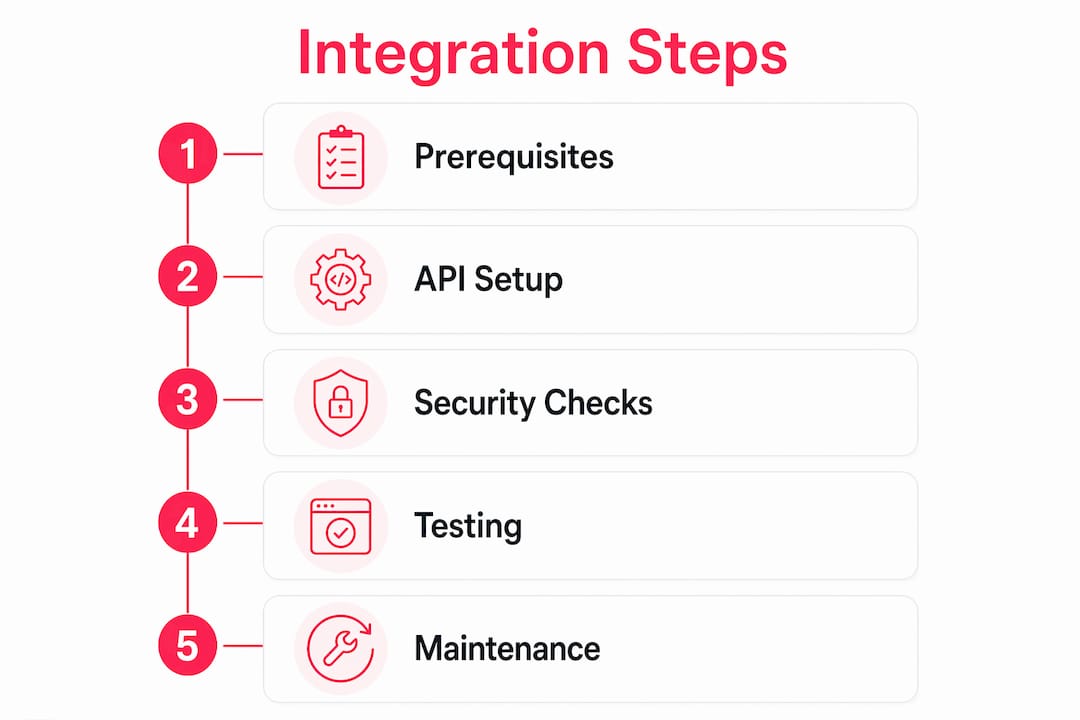
What prerequisites do you need before secure payment integration?

Before writing a single line of integration code, you need the right accounts, credentials, and infrastructure in place. Skipping this stage is one of the most common reasons integrations stall or go live with security gaps.
The core prerequisites are:
- Merchant account — a business bank account approved to accept card payments, either directly or through a payment service provider such as Stripe, Braintree, or Opayo
- Payment gateway account — the technical layer that authorises transactions; your gateway provider issues the API keys you will use throughout
- Compatible ecommerce platform — Magento, Shopify, and similar platforms have documented extension points for payment gateway setup; confirm your platform version supports your chosen gateway’s SDK
- Developer resources — access to a backend developer familiar with REST APIs and your platform’s payment module architecture
- Reliable TLS/SSL certificate — every page in the checkout flow must be served over HTTPS; no exceptions
- Sandbox credentials — your gateway provider will issue test API keys separately from live keys; keep them in separate environment configurations from day one
A merchant account setup and compatible software are non-negotiable starting points, and providers consistently recommend obtaining sandbox credentials and planning a careful go-live monitoring period before switching to production keys.
| Prerequisite | Purpose |
|---|---|
| Merchant account | Receives settled funds from card transactions |
| Gateway API credentials | Authenticates your server-to-server payment calls |
| TLS/SSL certificate | Encrypts data in transit across the checkout |
| Sandbox environment | Allows safe testing without real card data |
| Compatible SDK or hosted fields | Prevents raw card data reaching your server |
Pro Tip: Store your live API keys in environment variables or a secrets manager such as AWS Secrets Manager or HashiCorp Vault. Never commit them to version control, even in a private repository.
How do you implement the technical steps for secure payment integration?
The technical side of integrating secure payments follows a clear sequence. Rushing any step, particularly around how card data is collected, creates PCI scope problems that are expensive to fix after launch.
-
Embed hosted fields or an SDK at the frontend. Tools like NMI’s Collect.js inject payment fields directly from the gateway’s domain into your checkout page. Your server never sees raw card numbers, CVV codes, or expiry dates. This is the single most effective way to reduce your PCI scope.
-
Load the gateway script securely. Reference the gateway’s JavaScript from its official CDN using a subresource integrity (SRI) hash. This prevents supply chain attacks where a compromised CDN serves malicious code to your checkout.
-
Create a payment intent or token on the backend. When the customer submits the form, your server makes an authenticated API call to the gateway to create a payment intent. The gateway returns an opaque token. Your backend stores and processes that token, not the card data itself. Tokenisation protects card data and means fields like "cardNumber
,cvc, andexpiry` never pass through your application layer. -
Confirm the transaction and handle the response. Your backend receives a synchronous response indicating authorisation success or failure. Map every response code to a clear user-facing message. Payment authorisation round trips typically take 1 to 3 seconds, so your UX must handle loading states and error messages gracefully to avoid customers double-clicking the pay button.
-
Integrate 3D Secure. For UK merchants, Strong Customer Authentication (SCA) under PSD2 makes 3D Secure mandatory for most card transactions. 3D Secure uses shared secret keys for signature verification and requires merchant-side configuration to trigger the appropriate ACS challenge flow. Your gateway SDK usually handles the redirect or modal, but you must configure your merchant account to request it.
-
Set up and validate webhooks. Webhooks deliver asynchronous payment status updates to your server. Webhook updates require HMAC signature validation using a shared secret, plus idempotency checks so that duplicate delivery attempts do not trigger duplicate fulfilments. Store the unique event ID before processing, not after.
| Integration method | PCI scope impact | Best suited for |
|---|---|---|
| Hosted fields / Collect.js | Lowest (SAQ A) | Most Magento and Shopify stores |
| Redirect to gateway page | Low (SAQ A) | Simpler stores, lower dev resource |
| Direct API (server-side card data) | Highest (SAQ D) | Requires full PCI audit; avoid unless necessary |
| SDK with tokenisation | Low to medium | Mobile-first or headless commerce builds |
Pro Tip: Use your gateway’s webhook testing tool to simulate failed deliveries and confirm your idempotency logic handles retries without creating duplicate orders.
What best practices keep your integration compliant and secure?
Getting the integration live is only half the job. The best practices for payment integration that separate a genuinely secure checkout from a superficially compliant one come down to discipline in how you handle data, credentials, and configuration.
The non-negotiables are:
- Never log raw card data. Adjacent systems including crash reporters, analytics tools, and application logs must filter out payment fields. Accidental PCI non-compliance through logging is more common than most merchants realise, and it is just as serious as a deliberate breach.
- Rotate API keys on a schedule. Treat gateway credentials like passwords. Rotate them at least annually, and immediately if a team member with access leaves the business.
- Use AVS, CVV, and velocity checks. Address Verification Service and CVV matching are fraud signals your gateway can enforce at the authorisation stage. Velocity checks flag unusual transaction patterns, such as multiple small charges from the same IP address in a short window.
- Choose webhook payload variants that exclude sensitive data. Routing notifications to non-PCI systems using stripped-down webhook payloads reduces the compliance burden on your internal services. Your order management system does not need to receive full card details to update an order status.
- Implement replay attack prevention. Check the webhook timestamp and reject events older than five minutes. Combined with signature verification, this closes the window for an attacker replaying a captured webhook payload.
Security designs should invisibly layer protections like tokenisation and gateway-managed checks to balance a frictionless checkout with fraud reduction. Building a secure checkout flow
The checkout UX itself is part of your security posture. Predictable, clearly labelled payment flows reduce customer hesitation and lower the risk of users abandoning to a phishing site that mimics your checkout. Keep the payment step on your own domain where possible, use recognisable gateway branding, and display security indicators such as padlock icons and accepted card logos prominently.
Pro Tip: Run your checkout through your browser’s developer tools with the Network tab open. If you see any request sending card field values to your own server, stop and fix it before going live.
How do you test, troubleshoot, and maintain your payment integration?
Testing is where most security gaps surface before they become live incidents. A thorough payment integration checklist for testing covers both the happy path and every failure mode your customers might encounter.
- Test every card scenario in the sandbox using your gateway’s test card numbers, including declines, insufficient funds, 3D Secure challenges, and expired cards.
- Validate that your API credentials are correctly scoped. Test keys should only work in the sandbox; live keys should only work in production. Mixing them is a surprisingly common misconfiguration.
- Confirm response code mappings. Every gateway error code should produce a specific, helpful message for the customer, not a generic “payment failed” screen.
- Simulate webhook delivery failures. Disable your endpoint temporarily and confirm that your retry logic handles the backlog correctly when it comes back online, using idempotency to avoid duplicate processing.
- Check your ecommerce audit process covers payment flows specifically, including a review of what data appears in logs and whether any third-party scripts on the checkout page have unnecessary access to form fields.
Ongoing maintenance matters as much as the initial build. Payment gateways update their APIs, deprecate older authentication methods, and release security patches. Subscribe to your gateway provider’s developer changelog and treat payment integration updates with the same urgency as platform security patches. Monitor transaction success rates and customer feedback for signs of silent failures, where payments decline without a clear error message reaching the customer.
Hybrid tech stacks handling multiple payment methods benefit from carefully segregated webhook payloads and enforced internal service compliance, reducing PCI exposure across the whole system. If you add a new payment method, buy-now-pay-later for example, treat it as a fresh integration project with its own security review, not an add-on.
Key takeaways
Secure payment integration requires tokenisation, PCI DSS compliance, webhook validation, and continuous monitoring working together from day one.
| Point | Details |
|---|---|
| Start with prerequisites | Secure API credentials, sandbox access, and TLS before writing integration code. |
| Use hosted fields or SDKs | Keep raw card data off your server entirely to achieve the lowest PCI scope tier. |
| Validate every webhook | HMAC signature checks and idempotency prevent fraud and duplicate fulfilments. |
| Audit logs and adjacent systems | Filter payment fields from crash reporters and analytics to avoid accidental PCI breaches. |
| Test before and after go-live | Sandbox testing and ongoing monitoring catch failures before customers do. |
What we have learned from years of payment integration work
After 17 years building Magento and Shopify stores for UK retailers, the pattern we see most often is not a catastrophic breach. It is a slow accumulation of small oversights. A test API key left in a staging environment that mirrors production. A logging library quietly capturing form field values. A webhook endpoint that processes events without checking signatures because “it was only meant to be temporary.”
The merchants who handle this well treat payment security as an operational discipline, not a one-time technical task. They schedule quarterly reviews of their API key inventory. They include payment flow testing in every platform upgrade. They know which team member is responsible for monitoring transaction decline rates and who gets paged if something unusual appears.
What I would push back on is the idea that a tighter security posture means a worse customer experience. The opposite is true. A checkout that loads quickly, handles errors clearly, and does not redirect customers to an unfamiliar domain converts better and generates fewer support tickets. The ecommerce launch checklist we use at Bigeyedeers treats payment security and conversion optimisation as the same problem, because they are.
The uncomfortable truth is that most payment integration problems are not discovered by security researchers. They are discovered by customers who cannot check out, or by accountants who notice something odd in the transaction reports. Proactive monitoring, regular audits, and a team that takes ownership of the payment stack are worth more than any single technical control.
— Steve
How Bigeyedeers can help with your payment integration
At Bigeyedeers, we build and support payment integrations for Magento and Shopify stores across the UK, from initial gateway setup through to PCI compliance reviews and ongoing security monitoring using Sansec. We have handled everything from straightforward Shopify Payments configurations to complex Magento B2B builds with multiple payment methods, tiered pricing, and ERP-connected order flows.

If you are planning a new integration or concerned about the security of an existing one, our team is ready to help. Visit our meet the team page to find out who you would be working with and how we approach secure ecommerce development.
FAQ
What is the safest way to collect card data on my checkout?
Use hosted fields or a gateway SDK such as NMI Collect.js or Stripe Elements. These tools collect card data directly within the gateway’s domain, so raw card numbers never reach your server and your PCI scope drops to SAQ A.
Do I need 3D Secure for UK transactions?
Yes. Strong Customer Authentication under PSD2 requires 3D Secure for most card-not-present transactions in the UK. Your gateway must be configured to trigger the appropriate challenge flow, and failure to implement it correctly can result in liability shifting to the merchant.
How do I prevent duplicate orders from webhook retries?
Store the unique event ID from each webhook payload before processing it, not after. This “store-then-process” approach means that if the same event is delivered twice, your system recognises the ID and skips the duplicate without creating a second order or charge.
What is PCI DSS and does it apply to my store?
PCI DSS is the Payment Card Industry Data Security Standard, and it applies to any business that accepts, processes, or transmits card data. Using hosted fields or a redirect gateway keeps you at the lowest compliance tier (SAQ A), which is achievable for most Magento and Shopify merchants without a full audit.
How often should I review my payment integration security?
Review your API key inventory, webhook configurations, and log outputs at least quarterly. Treat every platform upgrade or new payment method addition as a trigger for a dedicated security review, and subscribe to your gateway provider’s developer changelog for patch notifications.
Recommended



Adobe Commerce (Magento)
Formerly known as Magento, Adobe Commerce is built for complex catalogues, integrations, and long term growth. We design and develop stable, scalable stores that support demanding eCommerce requirements, including multi-store setups, complex pricing, and Hyva based performance improvements.

Bespoke Build
We design and build custom eCommerce platforms for businesses with complex workflows, integrations, or non standard requirements. Built from scratch around your business needs using Laravel and modern architectures.

Working with brands across the UK from our offices in Cardiff and Exeter, you deal directly with a senior team of designers and developers specialising in Shopify, Magento, WordPress and bespoke eCommerce platforms.
We focus on commercial outcomes. Better conversion rates, strong SEO foundations and eCommerce platforms that continue to improve long after launch.