The role of wireframing in design: 2026 guide
TL;DR:
- Wireframes serve as strategic blueprints that define product structure, user flow, and content hierarchy early in the design process.
- Testing wireframes with just five users reveals most usability issues at a fraction of the cost of post-release fixes, ensuring alignment among teams.
Most designers and product managers have sat through a project post-mortem where someone says “we should have caught that earlier.” More often than not, the root cause is skipping or rushing wireframing. The role of wireframing in design is far more strategic than many teams give it credit for. It is not a preliminary sketch you produce before the “real work” begins. It is the thinking tool that shapes every decision downstream, from information architecture to developer handoff, and getting it right early is what separates expensive rewrites from smooth, on-budget deliveries.
Table of Contents
- Key takeaways
- What wireframes actually are and do
- Wireframing for UX and early usability testing
- Wireframing as a collaboration and alignment tool
- Wireframing best practices for 2026
- Wireframes vs. prototypes vs. mockups
- My take on wireframing’s strategic value
- How Bigeyedeers approaches UX design and wireframing
- FAQ
Key takeaways
| Point | Details |
|---|---|
| Wireframes are structural blueprints | They define layout, content hierarchy, and user flow before any visual design or code begins. |
| Early testing saves significant cost | Fixing issues at wireframe stage costs up to 100x less than fixing them post-release. |
| Wireframes align cross-functional teams | They give designers, developers, and stakeholders a shared reference to prevent scope creep. |
| Keep wireframes deliberately rough | Overpolished wireframes slow iteration and produce dishonest feedback from stakeholders. |
| Wireframes are distinct from prototypes | Each deliverable serves a different purpose; skipping wireframes weakens the entire UX process. |
What wireframes actually are and do
There is a persistent misunderstanding that wireframes are just rough drawings. They are not. Wireframes are low-fidelity blueprints that define page layout, content hierarchy, and user flow before any visual design work begins. Think of them as the architectural floor plan for a building. You would not start laying bricks before the plan is agreed, and you would not start building a digital product before the structure is mapped.
Critically, wireframes are defined by what they exclude as much as what they include. No brand colours. No photography. No typography decisions. No decorative elements. This deliberate stripping away of visual noise is what makes them so powerful as thinking and communication tools.
Fidelity levels matter. Wireframes typically exist across three levels:
- Low fidelity: Hand sketches or simple digital boxes representing rough layout and flow. Fast to produce, easy to discard, ideal for early exploration.
- Mid fidelity: Digital wireframes with defined content zones, basic navigation patterns, and placeholder text. Most teams spend the majority of their wireframing time here.
- High fidelity: Detailed wireframes with annotated specifications, real content, and interaction notes. These sit closer to a specification document than a sketch.
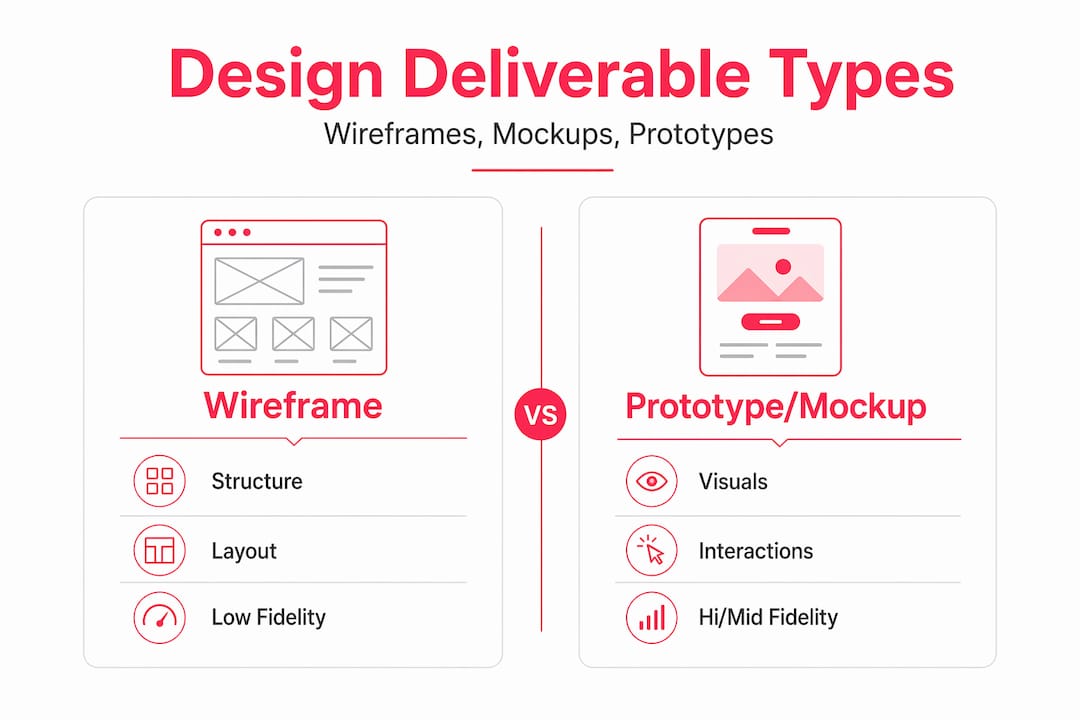
The difference between wireframes and their siblings, prototypes and mockups, trips up a lot of product managers. Wireframes communicate structure. Mockups communicate visual design. Prototypes simulate interaction. Each serves a distinct purpose in the process, and wireframes set the project foundation that everything else is built upon.
Pro Tip: Annotate your wireframes. A box labelled “search bar” tells a developer nothing about expected behaviour, but a wireframe note that reads “type-ahead suggestions trigger after 3 characters, returns top 5 results” eliminates a question that would otherwise surface at code review.
Wireframing for UX and early usability testing
One of the strongest arguments for taking the role of wireframing in UX seriously is the economics of early testing. Fixing navigation problems at wireframe stage costs up to 100x less than making the same fix post-release. IBM’s Systems Sciences Institute research behind that figure is well established, and it should be enough to justify the time investment on its own.
The practical process for wireframe testing does not require a large budget or a complex lab setup:
- Define tasks based on your information architecture. Ask users to complete flows like “find a product in category X” or “locate the returns policy.” These reveal friction in navigation and hierarchy, not visual preference.
- Recruit five representative users. Testing with five users uncovers around 85% of major usability issues. You do not need a panel of fifty to get meaningful signals at this stage.
- Observe, do not lead. Watch where users hesitate, click incorrectly, or express confusion. These moments are your data. Narrated sessions catch things that click-tracking misses.
- Separate structural feedback from visual feedback. This is where wireframes give you a genuine advantage. Because there is no visual design to react to, feedback focuses entirely on whether the structure and flow make sense.
- Iterate before moving forward. A wireframe can be revised in hours. A high-fidelity prototype or a coded page cannot.
“Wireframe testing targets structural and navigation issues early, which are cheap to fix compared to design flaws discovered later.” — MockFlow
The separation of concerns here is important. When you test a fully designed mockup, stakeholders and users react to colour choices, font sizes, and imagery. You lose the signal about whether the underlying structure actually works. Testing wireframes isolates the structural question entirely, which makes the feedback more honest and more useful.
Wireframing as a collaboration and alignment tool
Ask any experienced product manager about the most expensive problems in a design project and they will describe a version of the same story: two months into development, someone senior sees the product for the first time and it is not what they imagined. Wireframes exist, in part, to prevent exactly this.

Wireframes function as shared artefacts that give designers, developers, product managers, and stakeholders a common reference point before any significant investment is made. When everyone is reacting to the same document, disagreements surface early, when they are cheap to resolve.
The benefits for cross-functional teams are specific and practical:
- Designers can validate structural decisions before investing time in visual design.
- Developers use wireframes to clarify component boundaries and layout ownership, which directly reduces the risk of late-stage rewrites and unstable code.
- Product managers can check that user stories map to actual interface elements, catching gaps before sprint planning.
- Stakeholders can give meaningful input at a stage where changes are inexpensive, rather than being presented with a near-finished product they cannot influence without cost.
Wireframes also play a direct role in managing scope creep. When a feature request arrives mid-project, a wireframe gives you a concrete artefact to assess it against. “Show me where this fits in the current flow” is a far more grounded response than an abstract discussion about priorities.
Pro Tip: Run a wireframe review session with your full cross-functional team before moving to visual design. Keep it time-boxed to 45 minutes and use a shared Figma file so annotations and comments are captured in context. This single habit removes a category of miscommunication from later stages entirely.
Wireframing best practices for 2026
Knowing the importance of wireframing is one thing. Doing it well is another. There are patterns that consistently separate teams who get genuine value from wireframing and those who produce documentation that nobody uses.
Keep them deliberately rough
This is the most counter-intuitive wireframing best practice, but it is the most important. Overpolished wireframes hinder early feedback. When a wireframe looks finished, stakeholders treat it like a finished product. They hesitate to suggest structural changes because it feels wasteful. They comment on font weight instead of navigation logic. Rough wireframes invite the right conversations.
Choose your tools for collaboration, not complexity
Figma has become the standard for good reason. It combines wireframing, component libraries, version history, and real-time collaboration in one environment. At Bigeyedeers, we use Figma to plan user journeys, wireframes, and interface systems before any development work begins. The ability for a product manager, designer, and developer to view and comment on the same wireframe simultaneously removes a whole layer of email back-and-forth.
The table below shows how common wireframe design tools compare for team collaboration:
| Tool | Best for | Collaboration | Fidelity range |
|---|---|---|---|
| Figma | Full design workflow | Real-time, multi-user | Low to high |
| Sketch | Mac-focused design teams | Plugin-dependent | Mid to high |
| Balsamiq | Quick low-fidelity wireframes | Limited | Low only |
| Whimsical | Rapid flow diagrams | Basic sharing | Low to mid |
Integrate wireframing with prototyping and testing tools
Wireframes should not live in isolation. Combining prototyping and usability testing tools allows teams to iterate based on real quantitative and qualitative feedback. Moving from a Figma wireframe to a clickable prototype in Maze or UserTesting adds an interaction layer without committing development resource.
For ecommerce specifically, wireframing product listing pages, category navigation, and checkout flows before any front-end build begins is where you recover the most time and cost. Understanding how to plan an ecommerce website from a structural perspective is directly tied to how well those wireframes define the customer journey.
Wireframes vs. prototypes vs. mockups
Designers and product managers frequently conflate these three deliverables, and the confusion leads to skipping stages that should not be skipped. Here is a direct comparison:
| Deliverable | What it communicates | When to use it | Fidelity |
|---|---|---|---|
| Wireframe | Structure, layout, content hierarchy | Post-research, pre-visual design | Low to mid |
| Mockup | Visual design, brand identity, colour | After structure is validated | High |
| Prototype | Interaction, flow, user behaviour | Before development begins | Mid to high |
The sequence matters. Wireframes validate structure. Mockups validate visual design. Prototypes validate interaction. Teams that skip wireframes and jump to mockups burn time on visual decisions before the underlying architecture is sound. They then discover structural problems in user testing, at which point the visual design has to be dismantled and rebuilt. That is the costly scenario that proper wireframing prevents.
For ecommerce builds specifically, strong site architecture shapes sales in measurable ways. Wireframing is where that architecture gets its first serious test, and getting it right before a single line of code is written is what keeps builds on budget.
My take on wireframing’s strategic value
I have worked on enough ecommerce projects to know that the teams who struggle most are often the ones who treated wireframing as a box-ticking exercise. They produced a few rough screens, got a nod from stakeholders, and moved straight to visual design. By the time they hit development, the gaps in the structure became impossible to ignore, and the rewrites were painful.
What I have found is that wireframing is most valuable when it is treated as a thinking exercise for the whole team, not just a deliverable for the designer. The best wireframe sessions I have been part of were messy, argumentative, and full of “wait, what happens if the user does this?” questions. That friction is productive. It is infinitely cheaper to have that argument over a box in Figma than over a coded component in staging.
The other thing I would say is this: the pressure to make wireframes look polished is real, especially when presenting to clients or senior stakeholders. Resist it. A wireframe that looks too good short-circuits honest feedback. People feel awkward telling you to move a whole section when it already looks finished. Keep them grey, keep them functional, and make it obvious that everything is still moveable.
The role of wireframing in UX does not end when the prototype begins. Good wireframes become living documents referenced through the development cycle. Developers check them when they are unsure about a component’s intended behaviour. QA teams use them to validate that the build matches the intent. That longevity is what makes the upfront investment worthwhile.
— Steve
How Bigeyedeers approaches UX design and wireframing
At Bigeyedeers, wireframing is not a preliminary formality. It is a foundational part of how we plan, build, and deliver high-performing ecommerce stores for Magento and Shopify clients.

Before any development work begins, our team uses Figma to map user journeys, define interface systems, and wireframe key flows including navigation, product discovery, and checkout. This upfront investment in structure is what keeps our builds on scope, on budget, and aligned with what clients actually need. If you are building or rebuilding an ecommerce store and want a team that treats ecommerce web design as a strategic discipline rather than a cosmetic one, we would like to talk. Visit our Shopify agency services or Magento web design pages to see how we work, or meet the team to find out more about our approach.
FAQ
What is the role of wireframing in design?
Wireframing defines the structure, content hierarchy, and user flow of a product before visual design or development begins. It acts as a shared blueprint that aligns teams, surfaces usability issues early, and reduces the cost of changes later in the project.
How do wireframes differ from prototypes?
Wireframes communicate layout and structure at low fidelity, while prototypes simulate interaction and user flow at mid to high fidelity. Wireframes come first to validate architecture; prototypes come later to validate behaviour before development begins.
How many users do you need to test a wireframe?
Testing with five users is enough to uncover around 85% of major usability issues at the wireframe stage. Small, focused testing sessions at this stage are far more cost-effective than large-scale testing of a finished product.
Why should wireframes be kept rough?
Overpolished wireframes slow iteration and lead stakeholders to give visual feedback rather than structural feedback. Deliberately rough wireframes signal that everything is still open for change, which produces more honest and useful input.
When should wireframing happen in a UX project?
Wireframing typically follows user research and precedes visual design and prototyping. It is the stage where structural decisions are validated before significant design or development investment is made.
Recommended



Adobe Commerce (Magento)
Formerly known as Magento, Adobe Commerce is built for complex catalogues, integrations, and long term growth. We design and develop stable, scalable stores that support demanding eCommerce requirements, including multi-store setups, complex pricing, and Hyva based performance improvements.

Bespoke Build
We design and build custom eCommerce platforms for businesses with complex workflows, integrations, or non standard requirements. Built from scratch around your business needs using Laravel and modern architectures.

Working with brands across the UK from our offices in Cardiff and Exeter, you deal directly with a senior team of designers and developers specialising in Shopify, Magento, WordPress and bespoke eCommerce platforms.
We focus on commercial outcomes. Better conversion rates, strong SEO foundations and eCommerce platforms that continue to improve long after launch.