Digital project management workflow: a practical guide
TL;DR:
- A digital project management workflow is a structured, automated process that guides projects from start to finish. It improves team efficiency by making work visible, reducing manual handoffs, and creating an audit trail. Successful implementation depends on proper process design, phased automation, and ongoing measurement.
A digital project management workflow is a structured, automated sequence of tasks and decisions that moves a project from initiation through to delivery. When built correctly, it replaces scattered emails, ad hoc spreadsheets, and verbal handoffs with a single, visible process that every team member can follow. Tools like Monday.com, Jotform, and Notion have made this accessible to teams of all sizes, but the tool is never the whole answer. The real work lies in designing the process first, then choosing the software to support it.
What makes a digital project management workflow effective?
An effective digital project management workflow does three things well: it makes work visible, it reduces manual handoffs, and it creates an audit trail. Structured digital workflows can enable nearly fourfold increases in operational volume by reducing latency in team handoffs. That is not a marginal gain. It means your team can handle significantly more work without adding headcount, simply by removing the delays that pile up between steps.

The industry term for this discipline is workflow management, and it sits within the broader practice of digital project management. Both terms are in common use, and you will see them used interchangeably. The distinction worth holding onto is this: workflow management focuses on the repeatable process, while project management covers the full lifecycle including scope, budget, and stakeholder communication.
Workflow management software acts as a central hub that aligns globally distributed teams across time zones. For project managers running remote teams, this is the practical difference between a project that drifts and one that delivers on schedule.
What tools and prerequisites do you need?
Getting the prerequisites right before you pick a tool saves a significant amount of rework later. The most common mistake is selecting software before you have mapped your existing process. Here is what to assess first.
Processes to document before digitising:
- Every recurring task sequence, including who triggers it and who receives the output
- Decision points where work gets approved, rejected, or redirected
- Handoff steps that currently rely on email or verbal confirmation
- Any step that regularly causes delays or requires chasing
Once you have that map, you can evaluate online project management tools against your actual requirements rather than a vendor’s feature list.
Key features to look for in project tracking software:
| Feature | Why it matters |
|---|---|
| Task dependencies | Prevents work starting before prerequisites are complete |
| Automation rules | Removes manual status updates and notifications |
| Integration support | Connects to your CRM, ERP, or communication tools |
| Audit logging | Records every action for accountability and review |
| Custom views | Lets different roles see the same data differently |
Tools like Monday.com, Notion, and Jotform each approach this differently. Monday.com excels at visual workflow boards with strong automation. Notion links goals, tasks, documents, and decisions in an interconnected system that feels nearly invisible to the user. Jotform handles form-based data collection and approval routing well. None of them is universally the best. The right choice depends on your team’s existing habits and your clients’ environments.
Adapting to client-used workflows rather than imposing a rigid toolset consistently produces better delivery outcomes. If your client already runs on a specific platform, working within it is almost always faster than convincing them to switch.
Pro Tip: Automate the most repetitive, low-judgement tasks first. Automating complex decision steps too early creates confusion and resistance. Build team confidence with small wins before expanding.
How do you build a digital workflow step by step?
Building a workflow that actually sticks requires a phased approach. Jumping straight to full automation is the fastest route to a failed rollout.
-
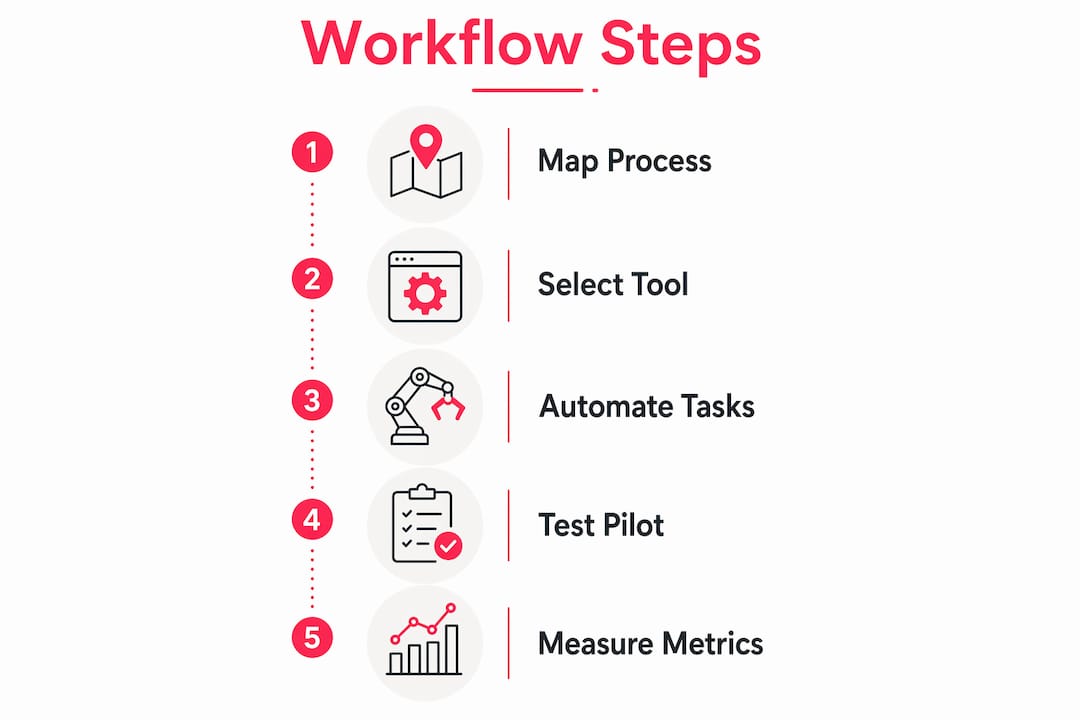
Map your current process. Document every manual or scattered workflow as it exists today, not as it should exist. Identify the highest-friction steps, meaning the ones that cause the most delays or errors.
-
Design the target workflow. Define roles, rules, and decision logic for the new process. Specify who owns each step, what triggers the next action, and what happens when something is rejected or escalated.
-
Build a Minimum Viable Product (MVP). Focus on automating 20–40% of manual tasks over a 4 to 8-week MVP phase. Pick one high-friction process and prove the concept before expanding. This keeps adoption manageable and gives you real data to work with.
-
Pilot test with a key team. Run the workflow with a small group and measure three things: task completion time, error rate, and team satisfaction. Gather qualitative feedback alongside the numbers.
-
Iterate, then roll out. Use pilot data to fix gaps before the organisation-wide launch. Pair the rollout with governance documentation and structured training. Assign a workflow owner who is responsible for ongoing quality.
Common workflows worth automating early include resource assignment, approval routing, status tracking, and project reporting. These are high-volume, low-complexity steps where automation eliminates human error and frees your team for higher-value work.
Workflow metrics to track during your pilot:
| Metric | What it measures |
|---|---|
| Lead time | Total time from task creation to completion |
| Throughput | Number of tasks completed per week |
| Rework rate | Percentage of tasks requiring correction |
| First-time right | Tasks completed correctly without revision |
Pro Tip: Run your pilot on a live project, not a test environment. Real conditions surface real problems. A controlled test will always look cleaner than reality.
What mistakes undermine digital workflow adoption?
The single most damaging mistake in workflow implementation is automating a broken process without redesigning it first. Automation does not fix a flawed process. It speeds it up, which means errors propagate faster and at greater scale. Document and simplify before you digitise.
Common pitfalls to avoid:
- Keeping legacy channels open. If email and spreadsheets remain available, people will use them. Retiring legacy channels immediately is not harsh. It is the only reliable way to drive adoption and maintain a clean audit trail.
- Skipping change management. A new tool without training and a clear reason for change will be ignored within weeks. Communicate the “why” before the “how.”
- No audit trail. Email and spreadsheets lack real-time visibility and auditability. Digital workflows should include automatic logging of every action, so bottlenecks and accountability gaps become visible immediately.
- Over-automating too quickly. Automating too many steps at once overwhelms teams and makes troubleshooting difficult when something breaks.
The goal is not to automate everything. The goal is to remove friction from the steps that matter most, and to make the process visible enough that problems surface before they become crises.
Pro Tip: Track real-time metrics from day one of your pilot. If you wait until the full rollout to measure, you lose the baseline data that proves the workflow’s impact.
How do you measure and scale your workflow over time?
Measurement is what separates a workflow that improves over time from one that stagnates. Start with four core metrics: lead time, throughput, rework rate, and first-time right. These give you a clear picture of where the process is working and where it is not.
A simple ROI model for workflow investment looks at three inputs: time saved per task multiplied by volume, error reduction costs, and team capacity freed for higher-value work. You do not need a complex model. A spreadsheet tracking those three numbers against your implementation cost will tell you what you need to know within the first quarter.
Scaling checklist:
- Confirm pilot metrics show consistent improvement before expanding
- Document the workflow fully before rolling it out to new teams
- Assign a named workflow owner for each process
- Build a feedback loop, meaning a regular review cycle where teams can flag issues
- Expand automation incrementally, adding one new process at a time
Automation and AI can allocate resources and summarise project documents, raising team efficiency at scale. This is where agile project management principles become particularly useful. Short review cycles, regular retrospectives, and incremental delivery all apply directly to workflow management, not just software development. The step-by-step web design process used in ecommerce projects is a strong example of how phased delivery and clear governance produce consistent results.
Digital project management requires evolving skills and embracing iterative delivery. The teams that scale workflows successfully treat the process as a product: they maintain it, improve it, and retire steps that no longer serve the project.
Key takeaways
A well-designed digital project management workflow reduces handoff delays, eliminates manual errors, and gives every team member clear visibility of where work stands.
| Point | Details |
|---|---|
| Map before you digitise | Document and simplify existing processes before selecting any tool or building automation. |
| Use an MVP phase | Automate 20–40% of manual tasks over 4–8 weeks to prove impact before scaling. |
| Retire legacy channels | Remove email and spreadsheets immediately to protect audit trails and drive adoption. |
| Measure from day one | Track lead time, throughput, rework rate, and first-time right from the start of your pilot. |
| Treat the workflow as a product | Assign an owner, build a feedback loop, and iterate continuously rather than treating rollout as the finish line. |
What I have learned from years of digital project delivery
The most useful thing I can tell you is this: the teams that struggle most with digital workflows are not the ones with the wrong tools. They are the ones that treated the tool selection as the project. The process design is the project. The tool is just where you run it.
We have seen this play out repeatedly in ecommerce delivery. A team spends weeks evaluating platforms, then launches with a half-mapped process and wonders why adoption is poor. The benefits of a project management system only materialise when the underlying process is sound. No amount of automation rescues a workflow that nobody understands.
The other thing worth saying plainly: flexibility is not a weakness. Adapting to how your client or team already works is not compromising your standards. It is recognising that adoption is the actual goal. A perfect workflow that nobody uses is worthless. An imperfect workflow that your whole team follows consistently is genuinely valuable.
My honest advice is to start smaller than feels comfortable. One process, one team, four weeks. Get the data. Then expand. The teams I have seen succeed with collaborative project management are the ones who treated the MVP phase seriously rather than rushing to a full rollout.
— Steve
How Bigeyedeers approaches digital project delivery
At Bigeyedeers, structured project workflows are central to how we design and build ecommerce platforms for clients across the UK.

With over 17 years of experience delivering Magento and Shopify projects, we know that clear process design before development begins is what separates projects that deliver on time from those that drift. Our use of Figma for user journey mapping and wireframing reflects exactly the kind of workflow discipline this article describes: define the process, then build it. If you are planning a new ecommerce build or a platform migration, our Magento web design service is built around the same phased, governed approach. We would be glad to talk through how it applies to your project.
FAQ
What is a digital project management workflow?
A digital project management workflow is a structured, automated sequence of tasks and decisions that coordinates project activities from initiation to delivery. It replaces manual handoffs with a visible, repeatable process supported by tools like Monday.com, Notion, or Jotform.
How long should the MVP phase take?
Teams should target a 4 to 8-week MVP phase, automating 20–40% of manual tasks in one high-friction process. This timeframe balances adoption risk with enough data to prove the workflow’s impact before scaling.
Why do digital workflows fail?
Most digital workflow failures result from automating broken processes without redesigning them first, which speeds up the propagation of errors rather than fixing them. Keeping legacy channels like email open after launch is the second most common cause of failed adoption.
Which tools work best for remote project teams?
Workflow management software that acts as a central hub, such as Monday.com or Notion, works well for remote teams because it aligns distributed members across time zones with shared visibility. The best choice depends on your team’s existing habits and your clients’ preferred platforms.
What metrics should I track for workflow performance?
Track lead time, throughput, rework rate, and first-time right from the start of your pilot. These four metrics give a clear picture of where the workflow is performing and where it needs adjustment.
Recommended



Adobe Commerce (Magento)
Formerly known as Magento, Adobe Commerce is built for complex catalogues, integrations, and long term growth. We design and develop stable, scalable stores that support demanding eCommerce requirements, including multi-store setups, complex pricing, and Hyva based performance improvements.

Bespoke Build
We design and build custom eCommerce platforms for businesses with complex workflows, integrations, or non standard requirements. Built from scratch around your business needs using Laravel and modern architectures.

Working with brands across the UK from our offices in Cardiff and Exeter, you deal directly with a senior team of designers and developers specialising in Shopify, Magento, WordPress and bespoke eCommerce platforms.
We focus on commercial outcomes. Better conversion rates, strong SEO foundations and eCommerce platforms that continue to improve long after launch.