Boost sales and compliance: website accessibility guide
TL;DR:
- Having an inaccessible ecommerce site causes significant revenue loss and legal risks due to non-compliance with UK laws. Improving site accessibility, particularly the checkout process, enhances user experience, boosts conversions, and ensures legal obligations are met efficiently. Regular testing, transparent policies, and expert support are essential for creating an inclusive, high-performing online store.
If your ecommerce site isn’t accessible, you’re quietly losing revenue every single day. 76% of disabled UK shoppers abandon purchases due to accessibility barriers, and that’s before you consider your obligations under the Equality Act 2010. The legal risk is real, and the commercial cost is significant. This guide walks you through exactly what UK ecommerce businesses need to know, what to fix first, and how to verify that your improvements are actually working, so you can protect revenue and stay on the right side of the law.
Table of Contents
- Understanding website accessibility standards and UK legal obligations
- Assessing your ecommerce site: common issues and what to prioritise
- Essential website accessibility improvements: step-by-step guide
- Testing and verifying your improvements
- Our take: why most ecommerce accessibility efforts fall short and what actually works
- Get expert help optimising your ecommerce accessibility
- Frequently asked questions
Key Takeaways
| Point | Details |
|---|---|
| Legal compliance vital | UK ecommerce sites must meet Equality Act standards with WCAG 2.2 AA compliance. |
| Checkout is critical | Prioritising accessible checkout and forms avoids silent abandonment by disabled shoppers. |
| Quick wins yield sales boost | Simple improvements can increase conversion rates and revenue substantially. |
| Combine manual and user testing | Use both automated tools and lived-experience feedback to find hidden barriers. |
| Transparent statements matter | Publishing an accessibility statement shows commitment and reassures regulators. |
Understanding website accessibility standards and UK legal obligations
Digital accessibility means ensuring that every visitor to your website, regardless of disability or impairment, can navigate, understand, and complete a purchase. That includes people with visual impairments, hearing loss, motor difficulties, or cognitive conditions. It’s not a niche concern. Disabled people and their households control spending power worth over £274 billion annually in the UK, often called the “purple pound.” Ignoring accessibility is simply bad business.
The legal picture is clear. UK ecommerce businesses must comply with the Equality Act 2010, which requires you to make “reasonable adjustments” so disabled users are not put at a substantial disadvantage compared to other customers. Failure to do so can lead to civil claims. There is no specific list of technical requirements in the Act, but WCAG 2.2 AA (Web Content Accessibility Guidelines) is the recognised de facto standard in the UK.
What does WCAG 2.2 AA actually require? Here is a practical breakdown for ecommerce:
| WCAG principle | What it means for your store |
|---|---|
| Perceivable | Product images need alt text; videos need captions; text contrast must meet minimum ratios |
| Operable | Full keyboard navigation; no seizure-triggering content; sufficient time to complete checkout |
| Understandable | Forms have clear labels; error messages explain what went wrong; language is set in code |
| Robust | Works across browsers and assistive technologies like screen readers |
The “reasonable adjustments” test is important to understand. Courts and regulators look at factors like the cost of the change, the size of your business, and whether it meaningfully removes a barrier. For most ecommerce improvements, such as adding alt text or improving form labels, the adjustments are inexpensive and clearly reasonable. There really is very little justification for not making them.
Assessing your ecommerce site: common issues and what to prioritise
With a clear understanding of obligations, the next step is auditing your current website’s accessibility and identifying problem areas.
Retail and ecommerce consistently lag behind other sectors in accessibility. Retail sites average 71 WCAG errors per homepage, the worst of any industry. That’s a striking number, and it means the average UK online shop has dozens of barriers that could be silently sending customers elsewhere. The frustrating part? Most businesses never receive direct complaints. Disabled users simply leave.
Here are the most common accessibility failures we see across ecommerce sites:
- Poor colour contrast on product descriptions, pricing, and call-to-action buttons, making text unreadable for users with low vision
- Unlabelled form fields in checkout, account registration, and search, causing screen readers to announce fields as simply “edit text” with no context
- No keyboard navigation support, meaning users who cannot use a mouse are completely locked out of menus, filters, and checkout steps
- Missing or inadequate alt text on product images, which removes essential information for visually impaired shoppers
- Auto-playing media with no controls, and carousels that cannot be paused, disorienting users with cognitive or vestibular conditions
- Inaccessible pop-ups and overlays, particularly cookie consent banners that trap keyboard focus or cannot be dismissed without a mouse
“69% of disabled users struggle with checkout specifically.” Retail websites worst for accessibility, making it the single highest-priority area for most UK online stores.
The absence of accessibility complaints is not evidence that your site works for everyone. It simply means disabled users are giving up and going elsewhere. This is a silent revenue leak.
Quick wins vs bigger investments:
| Issue | Effort | Business impact |
|---|---|---|
| Alt text for product images | Low | High |
| Form field labels | Low | High |
| Colour contrast fixes | Low to medium | High |
| Keyboard navigation | Medium | Very high |
| Accessible checkout flow | High | Critical |
| Video captions | Medium | Medium |
Pro Tip: Run your homepage and checkout through an automated tool such as Axe or WAVE before anything else. These tools will surface the quick wins in under ten minutes. Then use your accessibility checklist to prioritise what needs deeper work. You should also review a sample accessibility statement to understand what transparency looks like in practice.
It’s also worth benchmarking against ecommerce best practices more broadly when you audit, since accessibility touches performance, mobile usability, and conversion rate simultaneously.
Essential website accessibility improvements: step-by-step guide
Now that the gaps are clear, here’s how to fix them using a structured, step-by-step approach prioritised for real-world ecommerce impact.

Step 1: Fix your page structure and headings
Every page should have a single H1 heading, followed by a logical hierarchy of H2 and H3 headings. Screen reader users navigate by headings, much like sighted users scan visually. Broken or missing heading structures make pages impossible to navigate efficiently. Check your product pages, category pages, and blog posts first.
Step 2: Add meaningful alt text to all product images
Alt text should describe the image as if speaking to someone who cannot see it. For a product image, include key details: “Navy blue men’s crew-neck cotton jumper, front view.” Decorative images should have empty alt attributes (alt=“”) so screen readers skip them. This single fix improves both accessibility and SEO simultaneously.
Step 3: Label every form field correctly
Use proper HTML "
Step 4: Ensure full keyboard operability
Tab through your entire site using only a keyboard. Every interactive element, menus, buttons, filters, accordions, modals, must be reachable, activatable, and dismissible via keyboard. A visible focus indicator (the outline around the currently focused element) must be present at all times. Many themes suppress focus styles for aesthetic reasons, which is a serious accessibility failure.
Step 5: Meet colour contrast requirements
WCAG 2.2 AA requires a contrast ratio of at least 4.5:1 for normal text and 3:1 for large text and interface components. Use the WebAIM Contrast Checker to test your colour combinations. Pay particular attention to sale pricing (often shown in red or orange), ghost buttons, and text on imagery, which are common offenders.
Step 6: Address WCAG 2.2 specific ecommerce requirements
WCAG 2.2 introduced several requirements particularly relevant to online stores. WCAG 2.2 ecommerce nuances include providing alternatives to dragging interactions (such as sliders used for price filters), ensuring focus is never obscured by sticky headers or overlays, maintaining minimum touch target sizes of 24×24 pixels, avoiding redundant form entry across checkout steps, and never using puzzles or CAPTCHAs as the sole authentication method.
Step 7: Make your checkout fully accessible
This is where the revenue impact is greatest. Every payment form field must be labelled. Error messages must identify which field failed and explain how to fix it. Payment integrations need to be evaluated carefully. Review options such as accessible checkout integration that are built with accessibility in mind from the ground up.
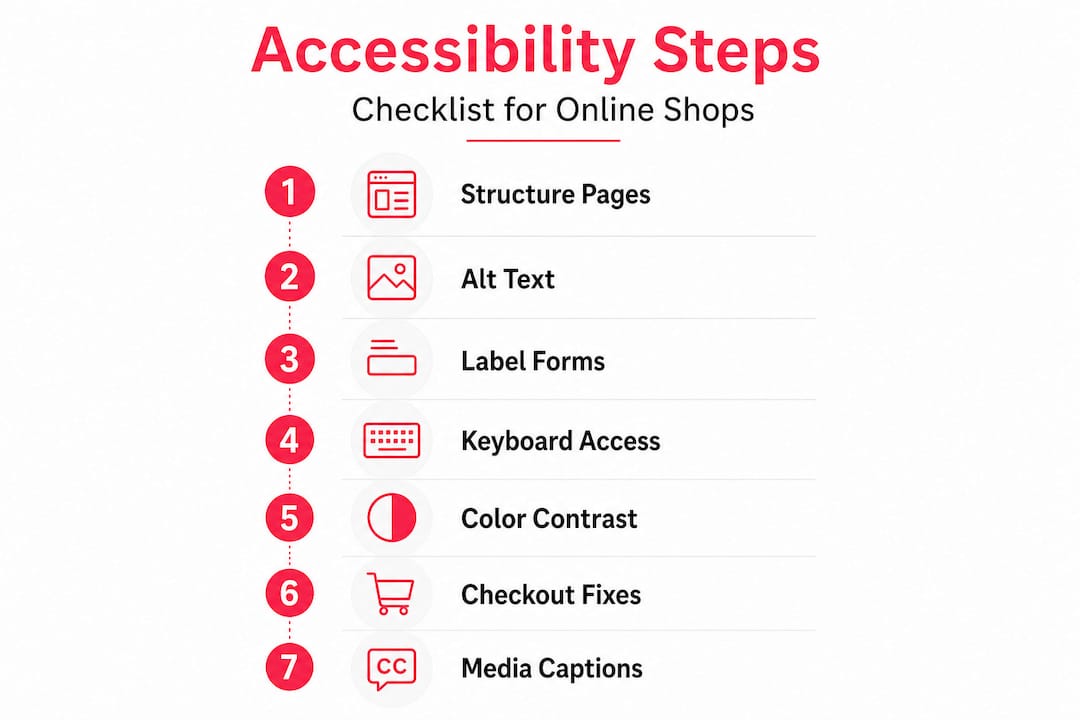
Step 8: Caption and transcribe media content
If you use product videos, how-to guides, or promotional content, add accurate captions. Auto-generated captions from video platforms are often inaccurate enough to be misleading, so review and correct them. For audio content, provide a text transcript.
Pro Tip: After implementing fixes, ask someone unfamiliar with your site to navigate from the homepage to a completed purchase using only a keyboard and a screen reader such as NVDA (free for Windows). Their experience will reveal gaps that automated tools simply cannot catch.
Accessible ecommerce web design is not just about compliance. Every one of these improvements makes the shopping experience cleaner, faster, and more intuitive for all users, not just those with disabilities.
Testing and verifying your improvements
Once you’ve made upgrades, it’s essential to verify they’re effective and future-proof, using smart testing and transparent communication.
Automated testing tools are a good starting point but catch roughly 30 to 40% of all WCAG issues. Use them consistently in your workflow, not as a one-off exercise. Key tools include:
- Axe DevTools (browser extension): Reliable, developer-friendly, integrates with CI pipelines
- WAVE (browser extension): Visual overlay shows errors directly on the page, excellent for quick audits
- Lighthouse (built into Chrome DevTools): Provides an accessibility score alongside performance metrics
- Tenon.io: Good for more detailed reporting and compliance documentation
Manual testing with NVDA and Chrome or VoiceOver and Safari catches nuances that automated tools miss entirely, including focus management issues, confusing reading order, and checkout flows that technically pass automated checks but are practically unusable. Motor impairment scenarios, such as completing checkout with switch access or voice control software, require real user testing to evaluate properly.
| Testing method | What it catches | Time investment |
|---|---|---|
| Automated scan | Basic WCAG violations, missing attributes | Low |
| Keyboard-only navigation | Focus order, interactive element access | Medium |
| Screen reader testing | Reading order, label quality, dynamic content | Medium to high |
| Disabled user testing | Real-world usability, edge cases | High |
Publishing your accessibility statement is both a legal best practice and a commercial signal. Publish an accessibility statement detailing your current conformance level, any known issues, the date of your last review, and how users can report barriers or request assistance. This demonstrates good faith to regulators and reassures potential customers that their experience matters to you.
Keep a log of accessibility issues found and resolved. This is useful evidence if a complaint is ever raised and demonstrates ongoing commitment rather than a one-off fix. Revisit your testing after every major theme update, new feature launch, or third-party integration, as these regularly introduce regressions. For a broader look at ongoing site health, our guidance on auditing your ecommerce site covers performance and security checks that pair well with accessibility reviews. You should also review our website testing tips for a more structured testing cadence.
Our take: why most ecommerce accessibility efforts fall short and what actually works
The technical steps above are crucial, but what we’ve seen over 17 years of building and supporting ecommerce sites tells a slightly different story about why accessibility improvements so often stall or fail to deliver results.
The most common problem is that accessibility gets treated as a compliance checkbox. A business runs an automated audit, fixes the errors flagged, publishes an accessibility statement, and considers the job done. This approach misses the point entirely. Automated tools, as we noted, catch a fraction of real barriers. More importantly, they can’t tell you whether a disabled customer can actually complete a purchase on your site.
The checkout is where most of the commercial opportunity lies, and it’s where most efforts fall short. Fixing alt text and heading structures is valuable, but it’s the checkout flow where proven sales strategies and accessibility intersect most directly. An accessible checkout is not just a legal requirement. It is a conversion rate optimisation tool. Every friction point removed for a disabled user is a friction point removed for everyone.
Our honest advice: start with what matters commercially. Fix checkout first. Get a disabled user to test it. Then work backwards through the rest of the journey. Do not try to fix everything at once, as this leads to paralysis. A realistic roadmap that prioritises checkout, then forms, then navigation, then media, will deliver measurable revenue improvements faster than a comprehensive but slow-moving overhaul.
The other thing we’d push back on is the idea that a high score in Lighthouse or Axe means you’re accessible. We’ve seen sites score 95+ in automated testing that are genuinely unusable with a screen reader. Real accessibility requires real users. Build that feedback loop from the start, and you’ll never regress as badly as most retail sites currently do.
Get expert help optimising your ecommerce accessibility
Accessibility improvements are genuinely achievable for any UK ecommerce business, but the scope and complexity grow quickly once you move beyond quick wins into checkout flows, custom components, and platform-specific implementation.

At Big Eye Deers, we build accessibility into the design process from day one, using Figma to map user journeys and interface systems before a line of code is written. Whether you’re on Shopify and need structural improvements through our Shopify accessibility support, or running a complex Magento build that needs specialist knowledge through our Magento accessibility experts, we can help you reach and maintain WCAG 2.2 AA compliance. The result is a more inclusive store that converts better and carries less legal risk. Get in touch to discuss where to start.
Frequently asked questions
What are the key accessibility requirements for UK ecommerce sites?
UK ecommerce sites must provide reasonable adjustments for disabled users under the Equality Act 2010, following WCAG 2.2 AA as the standard for navigation, forms, checkout, and media.
Which accessibility improvements matter most for boosting sales?
Optimising checkout, forms, and navigation delivers the biggest commercial gains, with accessible sites boosting revenue by 3 to 19% and conversions by 14 to 26%.
How can I test my online shop for accessibility?
Use a combination of automated tools like Axe and Lighthouse, alongside manual screen reader testing with NVDA or VoiceOver, and invite disabled users to test the checkout flow specifically.
Is an accessibility statement required by law?
It is not explicitly mandated for private sector ecommerce, but publishing a statement detailing conformance, known issues, and a feedback mechanism is strongly recommended as evidence of good faith compliance.
Why aren’t more UK ecommerce sites fully accessible?
Most retailers receive very little direct feedback from disabled users, creating a false sense of adequacy. Retail lags all other sectors in accessibility, meaning the barriers exist but silently cost businesses revenue without triggering obvious complaints.
Recommended



Adobe Commerce (Magento)
Formerly known as Magento, Adobe Commerce is built for complex catalogues, integrations, and long term growth. We design and develop stable, scalable stores that support demanding eCommerce requirements, including multi-store setups, complex pricing, and Hyva based performance improvements.

Bespoke Build
We design and build custom eCommerce platforms for businesses with complex workflows, integrations, or non standard requirements. Built from scratch around your business needs using Laravel and modern architectures.

Working with brands across the UK from our offices in Cardiff and Exeter, you deal directly with a senior team of designers and developers specialising in Shopify, Magento, WordPress and bespoke eCommerce platforms.
We focus on commercial outcomes. Better conversion rates, strong SEO foundations and eCommerce platforms that continue to improve long after launch.