Why upgrade site architecture: a practical guide
TL;DR:
- Poor site architecture harms search rankings, user experience, and conversion by hiding pages and causing crawl inefficiencies. Targeted fixes are often sufficient and less risky than full rebuilds, which are necessary only for obsolete technology or structural limitations. Regular monitoring and incremental improvements preserve SEO value, enhance usability, and drive ecommerce growth over time.
Your website might look perfectly presentable and still be costing you rankings, conversions, and customers every single day. Understanding why upgrade site architecture decisions matter goes well beyond aesthetics. The real damage is often invisible: buried pages, broken navigation flows, wasted crawl budget, and checkout funnels that bleed revenue silently. Most business owners either ignore structural problems until they become crises, or they panic and commission full rebuilds when targeted fixes would do the job. This guide cuts through both traps.
Table of Contents
- Key takeaways
- Why upgrade site architecture: what it actually means
- Structural fix or full rebuild?
- SEO and performance: the real impact
- UX and conversion: where architecture meets revenue
- My honest take on where businesses go wrong
- How Bigeyedeers can help
- FAQ
Key takeaways
| Point | Details |
|---|---|
| Architecture affects SEO and UX | Poor site structure reduces crawl efficiency and makes it harder for users to find what they need. |
| Fixes often beat full rebuilds | Targeted structural improvements can resolve most issues without the risk and cost of a complete overhaul. |
| URL changes carry real SEO risk | Incorrect or missing 301 redirects during restructuring can cause significant ranking drops. |
| Checkout architecture drives conversions | Simplifying funnel structure and reducing friction can recover a substantial portion of lost ecommerce revenue. |
| Governance prevents slow decay | Ongoing monitoring of internal links and navigation prevents the gradual ranking loss that creeps up unnoticed. |
Why upgrade site architecture: what it actually means
Before you can decide whether your site needs work, you need a clear picture of what site architecture actually covers. It is not just your homepage design or the colour scheme. Site architecture refers to the way your entire website is organised, how pages relate to one another, and how both users and search engines move through it.
The core components include:
- Hierarchy and page depth — how many clicks it takes to reach any given page from the homepage
- URL structure — whether your URLs are logical, descriptive, and consistent
- Navigation systems — your main menus, breadcrumbs, filters, and internal search
- Internal linking — the connections between your pages that distribute authority and guide visitors
- Category and content groupings — how products, articles, or services are clustered and labelled
All of these work together. A well-organised site lets users find what they need quickly and gives search engines a clear map of your content. A poorly organised one frustrates both. Sites structured to keep users within three clicks of any page improve navigation and search engine crawlability significantly. That principle, known as the three-click rule, sounds simple but has real implications for how you group and link your content. An ecommerce store with 5,000 products buried six levels deep in its category tree is working against itself, regardless of how good the product pages look.
The site structure tightly links business goals with measurable outcomes like navigational depth and link equity. That connection is why architecture decisions carry commercial weight.
Structural fix or full rebuild?
This is where most businesses go wrong. The assumption is that if the site feels broken, it needs to be replaced. That is rarely true, and acting on that assumption can be expensive and counterproductive.
A structural fix addresses specific problems within your existing setup. Examples include flattening navigation depth, improving internal linking, consolidating duplicate category pages, updating URL patterns for a section of the site, or fixing your breadcrumb schema. These changes are surgical. They carry lower risk, lower cost, and can often be done without touching your underlying platform.
A full rebuild is warranted when your technology is genuinely obsolete, when technical debt has accumulated to the point where fixing one thing breaks another, or when a fundamental shift in your business model requires a platform that your current one cannot support. A rebuild is appropriate for obsolete technology or unsustainable technical debt, while structural fixes handle hierarchy, navigation, and maintainability without full replacement.
The risks of misdiagnosing this are not trivial. Commissioning a full rebuild when fixes would suffice means months of disruption, unnecessary budget, and the very real risk of SEO regression. Full redesigns can hurt usability by disrupting established navigation patterns and damaging rankings when redirects are not managed correctly.
To diagnose accurately, ask yourself these questions:
- Does your current platform support what you need technically, or are you fighting it constantly?
- Is your content still valuable, or is most of it outdated and disorganised?
- Can your team maintain and update the site without specialist intervention for routine tasks?
- Are your conversion problems structural (checkout flow, category depth) or cosmetic (colours, fonts, imagery)?
If honest answers point to navigation, internal linking, and template issues rather than platform limitations, you almost certainly need a structural fix, not a rebuild.
Pro Tip: Before committing to any work, run a crawl of your site using a tool like Screaming Frog. Export the page depth report and the internal link count per page. Pages with fewer than three internal links pointing to them and more than four clicks from the homepage are prime candidates for structural attention.
| Scenario | Recommended approach |
|---|---|
| Navigation is confusing but platform is functional | Structural fix: revise hierarchy and menus |
| Platform cannot support required integrations | Full rebuild on a suitable platform |
| Duplicate content from filters and facets | Structural fix: URL governance and canonicalisation |
| Business has outgrown current category structure | Structural fix: category consolidation and remapping |
| Core Web Vitals failing due to legacy front-end code | Full rebuild or front-end replacement (e.g. Hyvä) |
SEO and performance: the real impact
One of the strongest reasons to upgrade site architecture is what it does for your search visibility. The improvements here are not marginal. They compound over time and affect every page on your site simultaneously.

Optimised architectures reduce wasted crawl budget on low-value pages and channel link equity to where it matters. In plain terms, search engines have a limited budget for crawling your site. If that budget is being spent on thin category pages, parameter-generated duplicates, or orphaned content, your high-value product and landing pages get crawled less frequently and rank lower as a result.
The hub-and-spoke internal linking model addresses this directly. You create authoritative category or topic pages (the hubs) and connect them to detailed supporting pages (the spokes). This channels PageRank to the pages you most want to rank, rather than scattering it across hundreds of low-value URLs.
URL changes during an architectural upgrade require careful handling. Redirect chains and catch-all redirects waste crawl equity and cause ranking drops. Every URL change needs a direct 301 redirect from the old URL to the new final destination. Not to another redirect. Not to the homepage. To the actual page. SEO value is often lost during URL restructuring when internal links are not updated to point to the new final URLs and instead rely on redirect chains.
Faceted navigation is a particular challenge for ecommerce sites. Filters for size, colour, and price generate parameter-based URLs that can multiply your page count dramatically. Faceted navigation can unintentionally create vast sets of low-value duplicate URLs that dilute your site’s authority. Without proper governance (canonical tags, noindex directives, or parameter handling in your robots.txt), you can inadvertently create thousands of pages that compete with and weaken your primary category pages.
Performance improvements also follow structural work. Reducing page depth means fewer redirects for users and crawlers to follow. Cleaner templates mean fewer render-blocking resources. These are not cosmetic outcomes. They feed directly into your Core Web Vitals scores, which are a confirmed ranking factor.
UX and conversion: where architecture meets revenue
Improving website structure is not just an SEO exercise. The user experience consequences are equally significant, and in ecommerce particularly, they translate directly into revenue.
Here is how to think about the connection between architecture and conversion:
-
Findability drives purchase intent. If a customer cannot find a product within a couple of clicks or a quick search, they will not buy it. Improving your category hierarchy and site navigation enhancements reduces the cognitive load on visitors and gets them to the right product faster.
-
Checkout funnel structure directly affects abandonment. Simplifying funnels and reducing form fields can recover up to 35% of abandoned carts. The checkout is an architectural component, not just a design one. How many steps it has, where accounts are required, and how guest checkout is presented are all structural decisions. Our guide on optimising your checkout process covers this in detail.
-
Broken internal links accumulate quietly. Internal linking decay on large sites causes ranking loss before anyone notices without ongoing maintenance. A broken link on a category page does not just frustrate the user who clicks it. It removes a pathway for both that user and search engine crawlers.
-
Deep click paths lose customers. Any product that requires more than four clicks from the homepage to reach is statistically less likely to be purchased. This is a structural problem, not a marketing one.
-
Architectural debt accumulates silently. Small issues, an extra redirect here, a broken breadcrumb there, add up over months and years into measurable drops in traffic and conversion.
The business case for upgrading website usability through architectural improvements is clear. Site architecture shapes ecommerce growth in ways that no amount of ad spend can compensate for.
Pro Tip: Schedule a monthly crawl of your site specifically to check for broken internal links and 4xx errors. Teams that run scheduled crawl-based checks to catch internal linking breakages early prevent the kind of ranking damage that takes months to recover from.
My honest take on where businesses go wrong
I have watched businesses spend £80,000 on a full website rebuild when a focused three-month structural improvement programme would have solved 90% of their problems. And I have seen the opposite too: businesses patching structural problems with new design coats of paint and wondering why nothing improves.
The key mistake is confusing cosmetic redesign needs with structural architectural problems. A site can look outdated but be structurally sound. A site can look polished and be architecturally chaotic. These are genuinely different problems requiring different solutions.
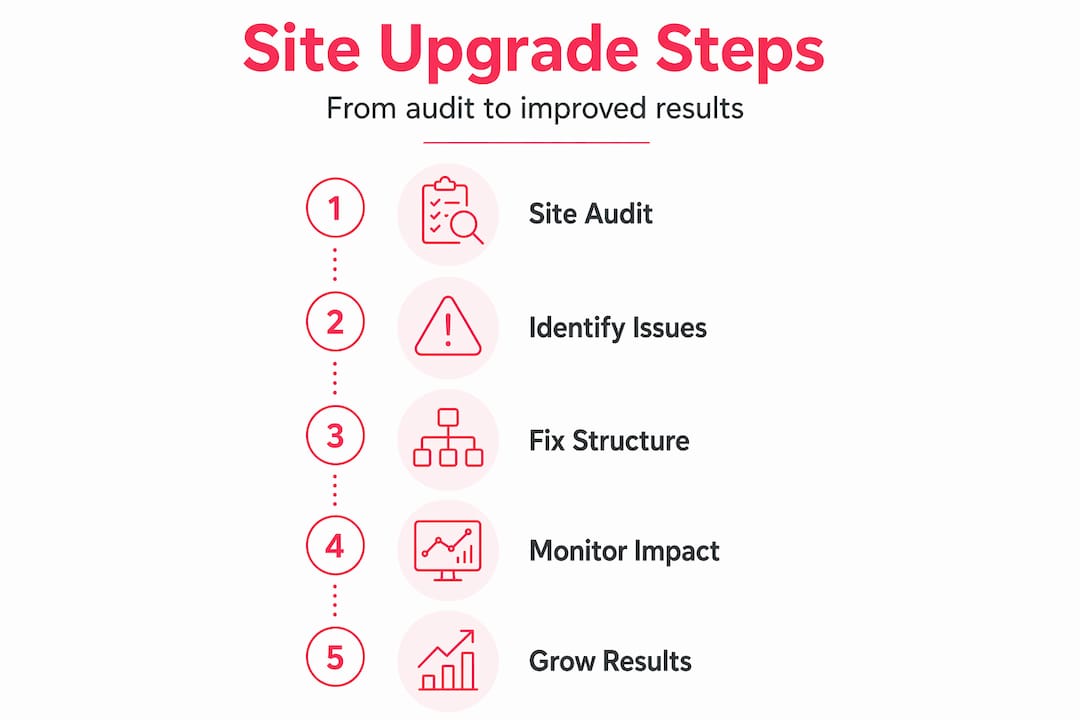
What I have found actually works is iterative improvement. Identify the three biggest structural bottlenecks, fix them with precision, measure the outcome, then move to the next three. This approach preserves ranking signals, keeps the team focused, and generates evidence of progress that makes future investment decisions easier to justify.
The hardest lesson I have learned is about URL changes during migrations. Every time we restructure a site and someone decides to also “clean up the URL structure” at the same time, we are stacking risk on risk. Separate these exercises where you possibly can. If you must change URLs, test your redirect mapping obsessively before going live.
My strongest advice: treat your website as ongoing infrastructure, not a one-off project with a launch date and a wrap party. The sites that perform best in five years are the ones being tuned continuously, not the ones launched once and left to drift.
— Steve
How Bigeyedeers can help
If anything in this article has prompted a “that sounds familiar,” it is worth having a proper conversation about where your site actually stands.

At Bigeyedeers, we work with ecommerce businesses across Magento and Shopify to diagnose exactly these kinds of structural and performance issues. We use Figma to map user journeys and navigation flows before a single line of code changes. Our Magento web design service covers everything from category hierarchy and URL governance to Hyvä front-end builds and full platform migrations. Whether you need a targeted structural fix or a considered rebuild, we start from diagnosis, not assumptions. Take a look at what we do and get in touch if you want a frank assessment of your site’s architecture.
FAQ
What is site architecture and why does it matter?
Site architecture refers to how your website’s pages are organised, linked, and structured. It affects how easily users and search engines can navigate your content, directly influencing rankings and conversion rates.
How do I know if I need a structural fix or a full rebuild?
If your platform still meets your technical needs but your hierarchy, navigation, or internal linking is causing problems, a structural fix is almost always the right call. A rebuild is only warranted when the underlying technology is genuinely obsolete or cannot support your business model.
Can upgrading site architecture improve my SEO?
Yes, significantly. Improving site hierarchy reduces wasted crawl budget, strengthens PageRank flow to important pages, and eliminates duplicate content issues that dilute your authority across search results.
How do URL changes affect SEO during a restructure?
URL changes must be handled with precise 301 redirects from every old URL to its new final destination. Redirect chains or missing redirects cause ranking drops that can take months to recover from.
How often should site architecture be reviewed?
At minimum, run a crawl-based audit every quarter. Monthly checks for broken internal links and navigation errors are good practice for any site with more than a few hundred pages, particularly in ecommerce.
Recommended



Adobe Commerce (Magento)
Formerly known as Magento, Adobe Commerce is built for complex catalogues, integrations, and long term growth. We design and develop stable, scalable stores that support demanding eCommerce requirements, including multi-store setups, complex pricing, and Hyva based performance improvements.

Bespoke Build
We design and build custom eCommerce platforms for businesses with complex workflows, integrations, or non standard requirements. Built from scratch around your business needs using Laravel and modern architectures.

Working with brands across the UK from our offices in Cardiff and Exeter, you deal directly with a senior team of designers and developers specialising in Shopify, Magento, WordPress and bespoke eCommerce platforms.
We focus on commercial outcomes. Better conversion rates, strong SEO foundations and eCommerce platforms that continue to improve long after launch.